# 지원 요청 가이드

# 기술 지원 요청 (Technical Support Request)

## 개요

 서포트 포털 이용자가 기술 지원을 요청할 수 있는 방법을 안내한 가이드 문서이다.

 포탈 사용자는 해당 문서를 통해 다음과 같은 목적을 달성할 수 있다.

1. Broadcom Support Portal을 통한 케이스 오픈
2. Etevers Wolken 페이지 직접 접속을 통한 케이스 오픈
3. 케이스 관리

<p class="callout warning">파트너가 고객의 기술 지원 케이스를 대신 오픈 할 경우, 반드시 파트너의 Site ID 정보가 아닌, 고객의 Site ID 정보를 선택해야 한다.   
파트너 계정에 고객의 Site ID 권한을 추가한 후 파트너 계정으로 케이스를 오픈하거나, 고객의 계정으로 직접 로그인하여 케이스를 오픈한다.   
</p>

---

### 대상 

<table border="1" id="bkmrk-%EB%8C%80%EC%83%81-%EC%83%81%ED%83%9C-%EB%B9%84%EA%B3%A0-%EC%84%B8%EC%9D%BC%EC%A6%88-%EA%B2%80%EC%88%98-%EC%97%94%EC%A7%80%EB%8B%88%EC%96%B4" style="border-collapse: collapse; width: 100%; height: 83.2px;"><colgroup><col style="width: 33.3731%;"></col><col style="width: 33.3731%;"></col><col style="width: 33.3731%;"></col></colgroup><thead><tr style="height: 29.6px;"><td class="align-center" style="height: 29.6px;">**상태**</td><td class="align-center" style="height: 29.6px;">**대상**</td><td class="align-center" style="height: 29.6px;">**범주**</td></tr></thead><tbody><tr style="height: 53.6px;"><td style="height: 53.6px;"><p class="callout success">검수</p>

</td><td class="align-center" style="height: 53.6px;">서포트 포탈 유저</td><td class="align-center" style="height: 53.6px;">LSR</td></tr></tbody></table>

---

## 내용

### Broadcom Support Portal 접속

<table border="1" id="bkmrk-%28%EA%B7%B8%EB%A6%BC%29-%EC%84%A4%EB%AA%85-%28%EA%B7%B8%EB%A6%BC%29-%EC%84%A4%EB%AA%85" style="border-collapse: collapse; width: 100%;"><colgroup><col style="width: 50.0596%;"></col><col style="width: 50.0596%;"></col></colgroup><tbody><tr><td>[![image.png](https://bs.etevers.tech/uploads/images/gallery/2025-10/scaled-1680-/eDhimage.png)](https://bs.etevers.tech/uploads/images/gallery/2025-10/eDhimage.png)

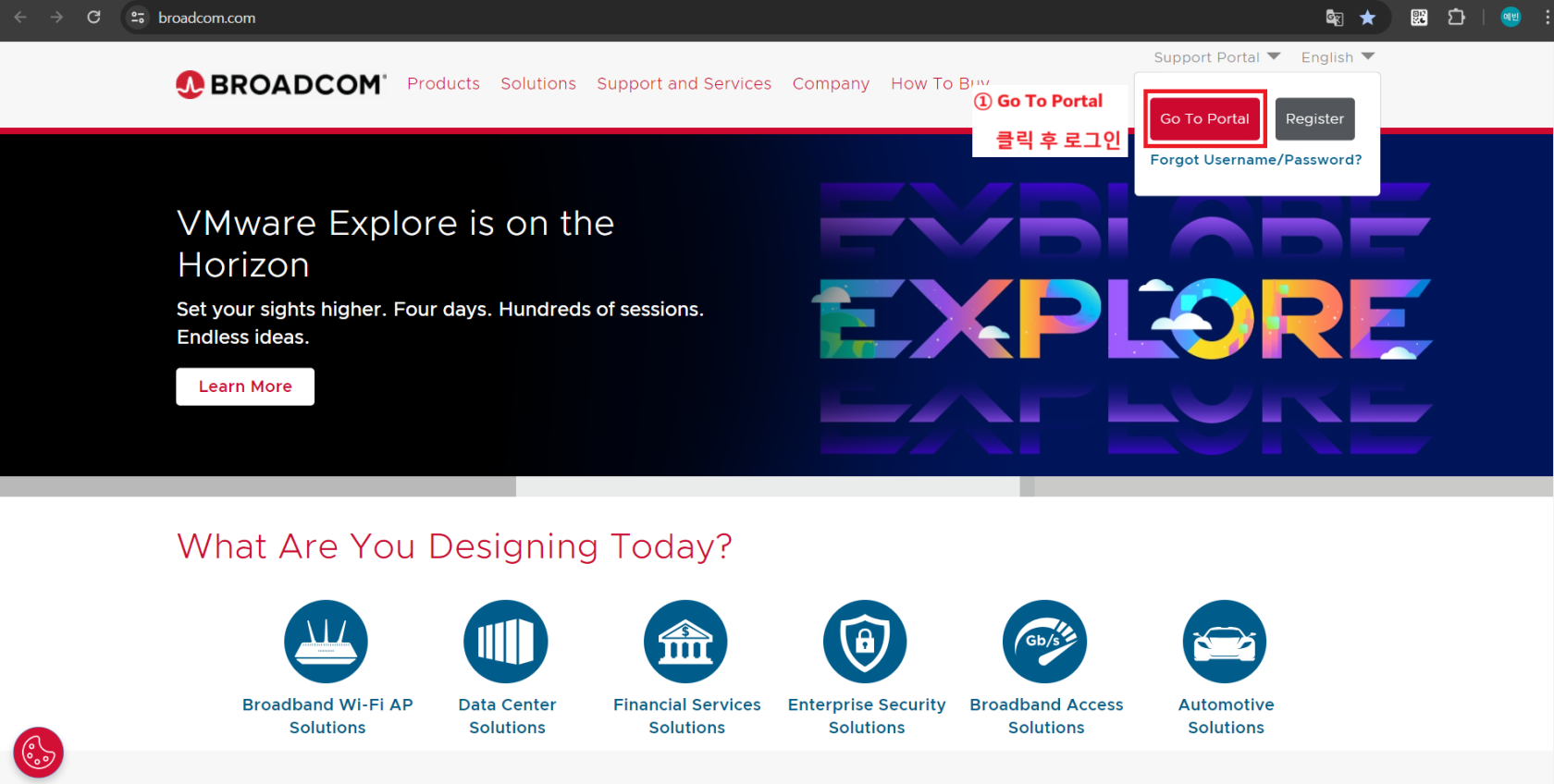
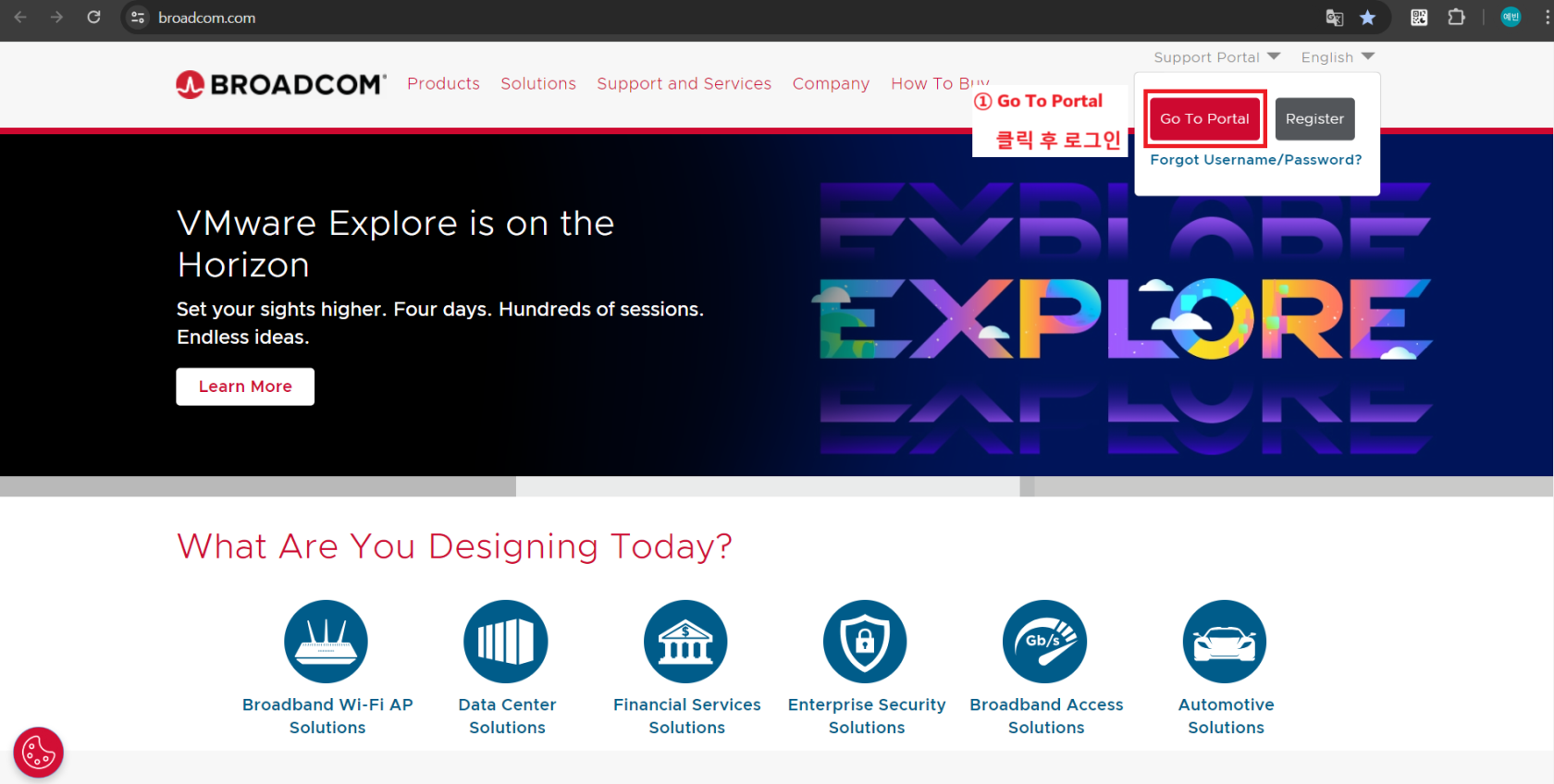
</td><td>- <span data-annotation-inline-node="true" data-annotation-mark="true" data-card-url="https://broadcom.com/" data-inline-card="true" data-renderer-start-pos="468"><span class="loader-wrapper"><span class="hover-card-trigger-wrapper" data-testid="hover-card-trigger-wrapper">[<span class="_19itglyw _vchhusvi _r06hglyw _o5721jtm _1nmz9jpi _16d9qvcn _ca0qv77o _u5f31b66 _n3tdv77o _19bv1b66" data-testid="inline-card-icon-and-title"><span class="_19itglyw _vchhusvi _r06hglyw">Broadcom Inc. | Connecting Everything</span></span>](https://broadcom.com/)</span></span></span> 접속 후 로그인

</td></tr></tbody></table>

---

#### 기술 지원 요청 (Technical Support Request) <span class="heading-anchor-wrapper" role="presentation"><button aria-hidden="true" class="css-vhh4ux" data-testid="anchor-button" type="button"><span aria-label="Copy" class="_1e0c1o8l _vchhusvi _1o9zidpf _vwz4kb7n _y4ti1igz _bozg1mb9 _12va1onz _jcxd1r8n" role="img"><svg class="_1reo15vq _18m915vq _syaz1r31 _lcxvglyw _s7n4yfq0 _vc881r31 _1bsbpxbi _4t3ipxbi" fill="none" role="presentation" viewbox="0 0 16 16"><path clip-rule="evenodd" d="M8.22 2.22a3.932 3.932 0 1 1 5.56 5.56l-2.25 2.25-1.06-1.06 2.25-2.25a2.432 2.432 0 0 0-3.44-3.44L7.03 5.53 5.97 4.47zm3.06 3.56-5.5 5.5-1.06-1.06 5.5-5.5zM2.22 8.22l2.25-2.25 1.06 1.06-2.25 2.25a2.432 2.432 0 0 0 3.44 3.44l2.25-2.25 1.06 1.06-2.25 2.25a3.932 3.932 0 1 1-5.56-5.56" fill="currentcolor" fill-rule="evenodd"></path></svg></span></button></span>

##### Broadcom Support Portal 통한 접속

<div class="layout-section-container" id="bkmrk-%EB%AC%B8%EC%9D%98%EB%A5%BC-%EC%9B%90%ED%95%98%EB%8A%94-vmware-%EC%A0%9C%ED%92%88-%EC%84%A0%ED%83%9D"><div data-layout-columns="2" data-layout-section="true"><div class="css-y2yz5o" data-column-width="66.66" data-layout-column="true"><div class="css-pw7jst"><div><table border="1" id="bkmrk-%EB%AC%B8%EC%9D%98%EB%A5%BC-%EC%9B%90%ED%95%98%EB%8A%94-vmware-%EC%A0%9C%ED%92%88-%EC%84%A0%ED%83%9D-1" style="border-collapse: collapse; width: 100%;"><colgroup><col style="width: 50.0596%;"></col><col style="width: 50.0596%;"></col></colgroup><tbody><tr><td>[![image.png](https://bs.etevers.tech/uploads/images/gallery/2025-10/scaled-1680-/qSiimage.png)](https://bs.etevers.tech/uploads/images/gallery/2025-10/qSiimage.png)

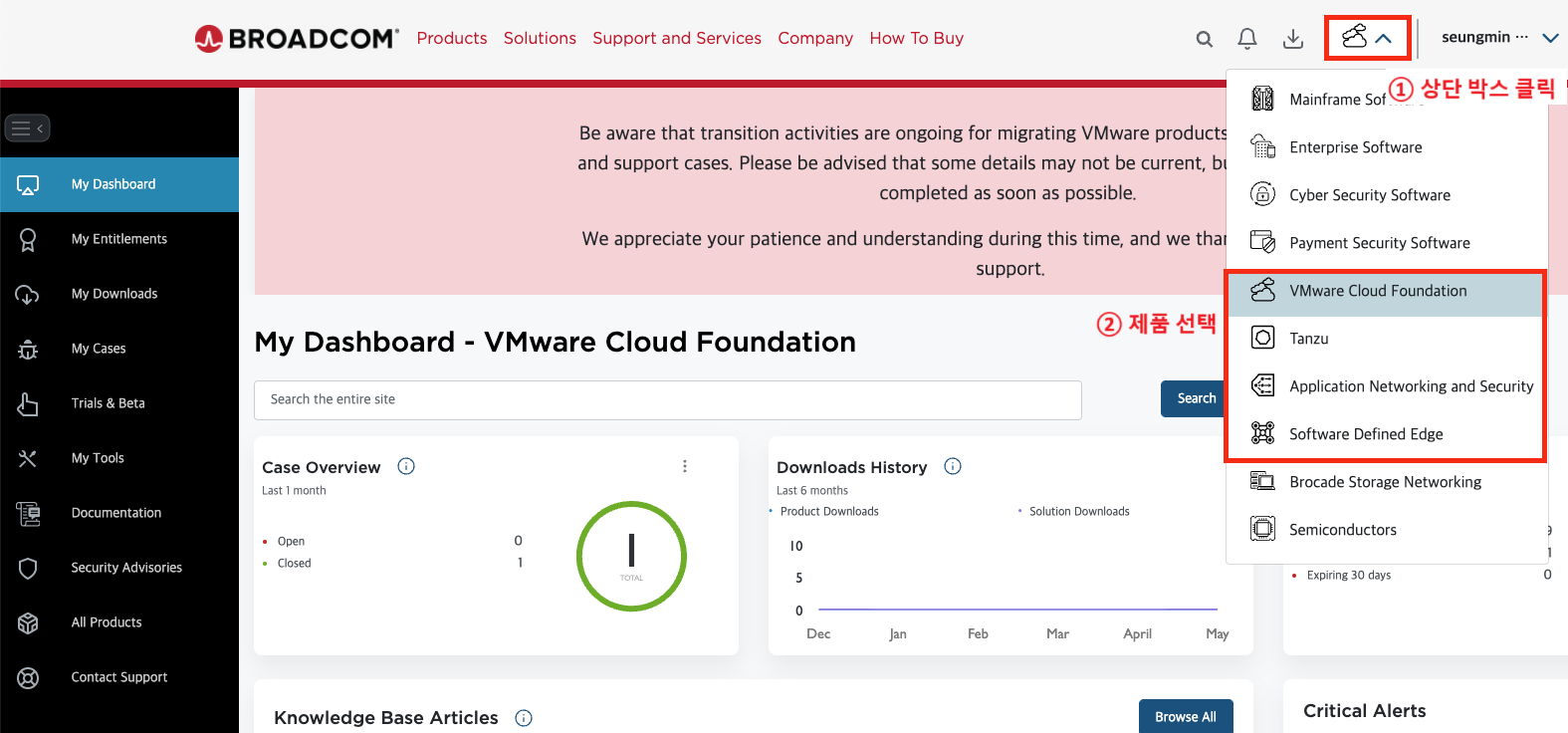
</td><td>- 문의를 원하는 VMware 제품 선택

</td></tr><tr><td>[![image.png](https://bs.etevers.tech/uploads/images/gallery/2025-10/scaled-1680-/3osimage.png)](https://bs.etevers.tech/uploads/images/gallery/2025-10/3osimage.png)

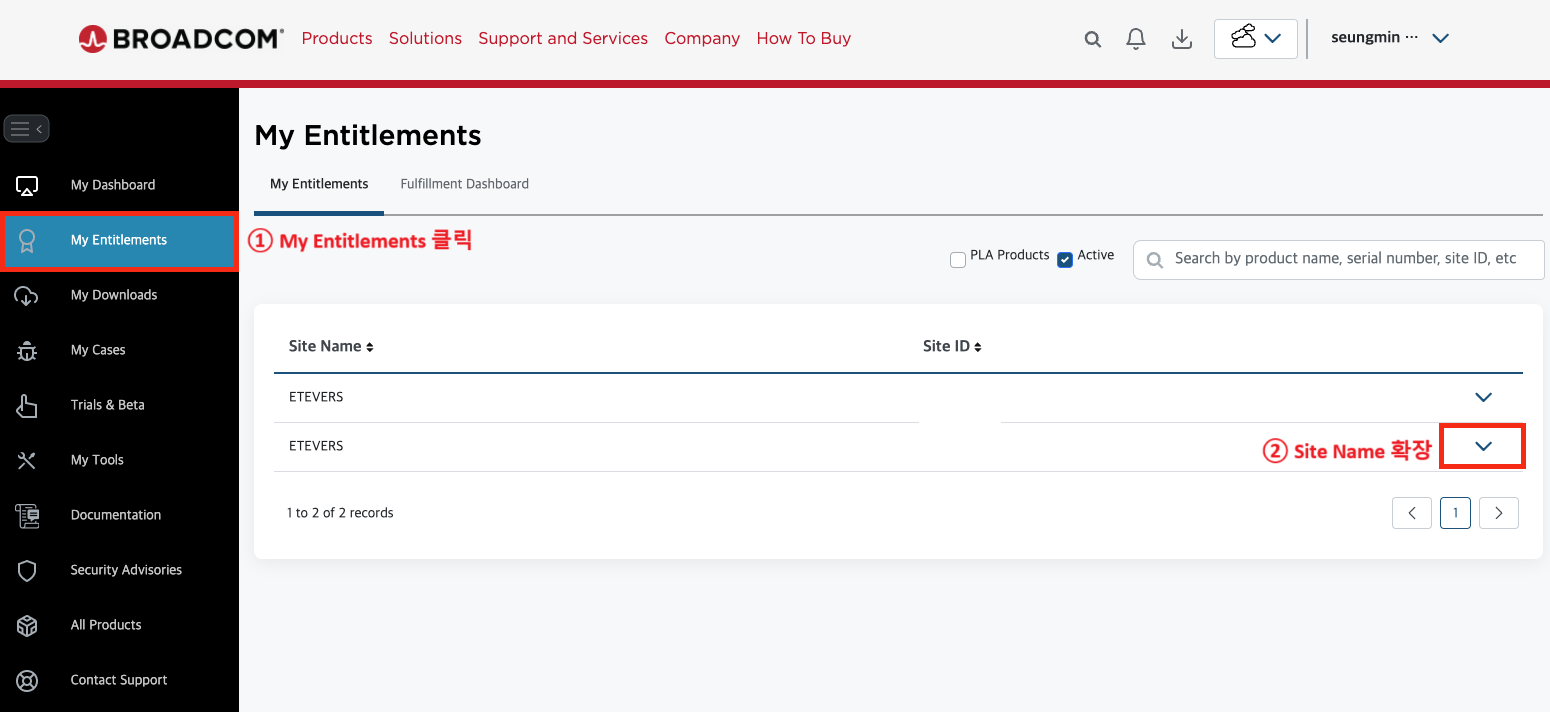
</td><td>- \[My Entitlements\] &gt; \[Site Name\] 확장

</td></tr><tr><td>[![image.png](https://bs.etevers.tech/uploads/images/gallery/2025-10/scaled-1680-/jJHimage.png)](https://bs.etevers.tech/uploads/images/gallery/2025-10/jJHimage.png)

</td><td>- \[Entitlement Details\] 또는 \[Product Details\] 버튼 선택 후 \[![image.png](https://bs.etevers.tech/uploads/images/gallery/2025-10/scaled-1680-/Povimage.png)(Cases)\] 버튼 클릭

</td></tr><tr><td>[![image.png](https://bs.etevers.tech/uploads/images/gallery/2025-10/scaled-1680-/F8eimage.png)](https://bs.etevers.tech/uploads/images/gallery/2025-10/F8eimage.png)

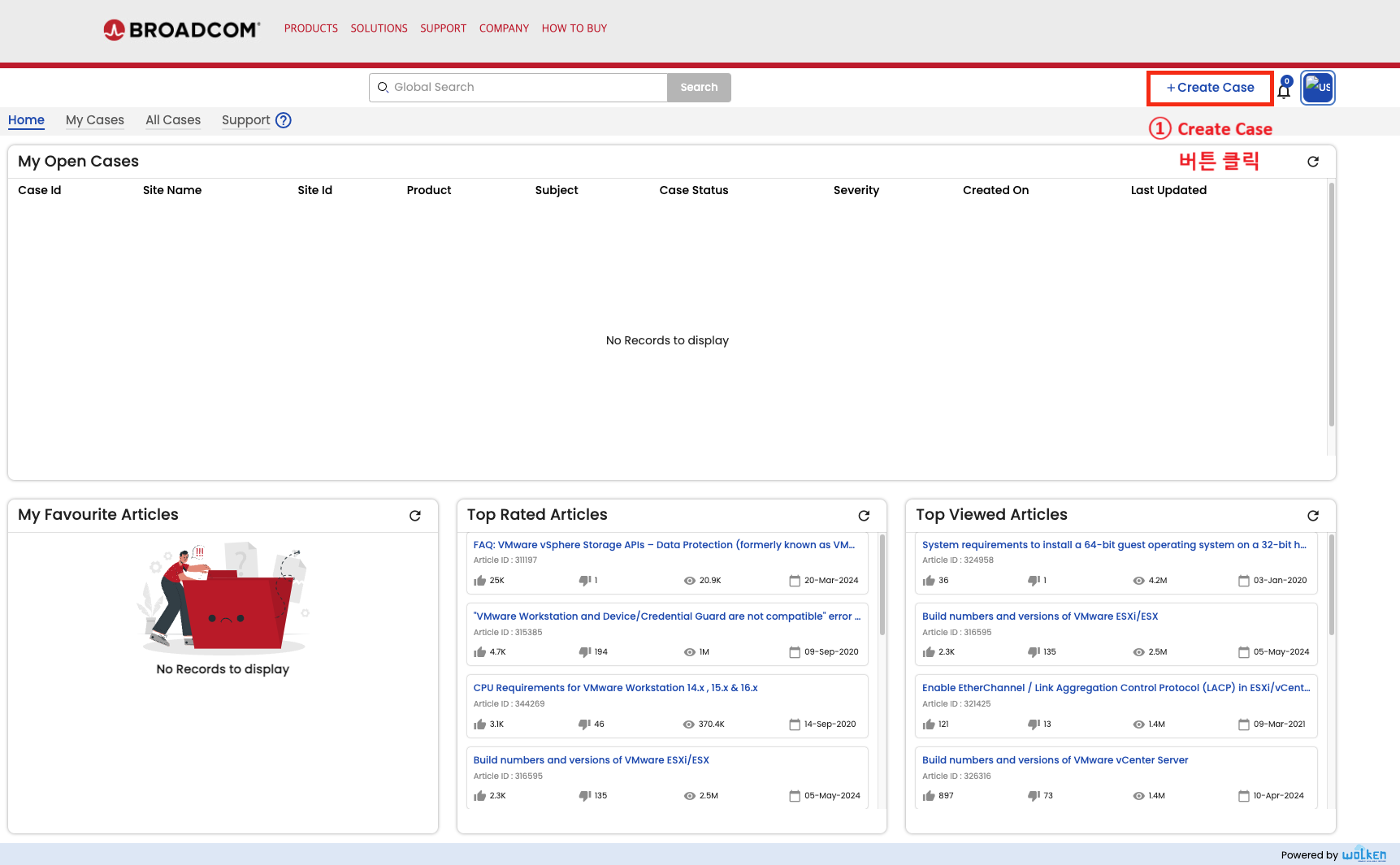
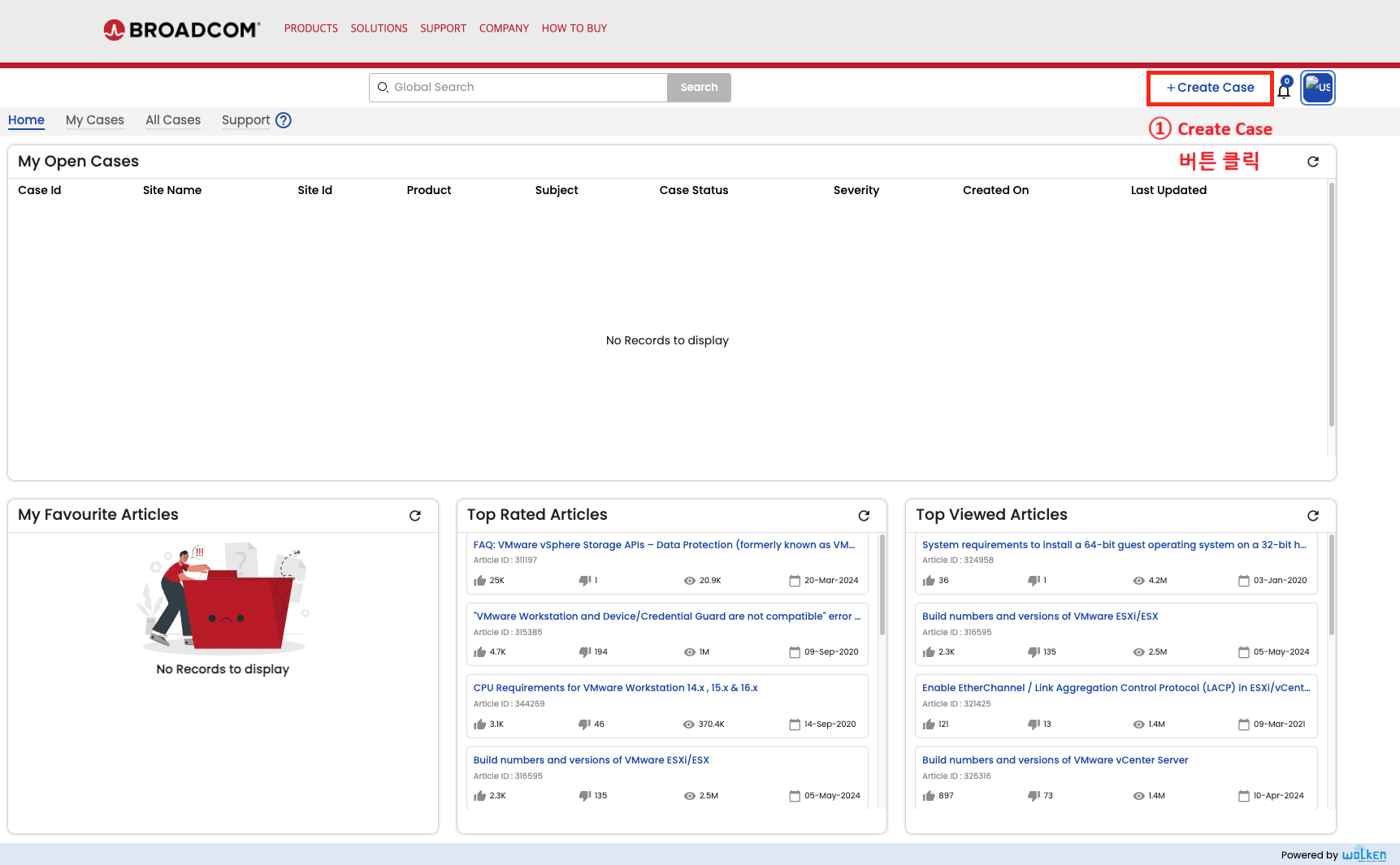
</td><td>- Wolken 페이지로 이동 후 \[Create Case\] 버튼 클릭하여 케이스 생성

</td></tr></tbody></table>

</div></div></div></div></div>##### Wolken 사이트 직접 접속<span class="heading-anchor-wrapper" role="presentation"><button aria-hidden="true" class="css-vhh4ux" data-testid="anchor-button" type="button"><span aria-label="Copy" class="_1e0c1o8l _vchhusvi _1o9zidpf _vwz4kb7n _y4ti1igz _bozg1mb9 _12va1onz _jcxd1r8n" role="img"><svg class="_1reo15vq _18m915vq _syaz1r31 _lcxvglyw _s7n4yfq0 _vc881r31 _1bsbpxbi _4t3ipxbi" fill="none" role="presentation" viewbox="0 0 16 16"><path clip-rule="evenodd" d="M8.22 2.22a3.932 3.932 0 1 1 5.56 5.56l-2.25 2.25-1.06-1.06 2.25-2.25a2.432 2.432 0 0 0-3.44-3.44L7.03 5.53 5.97 4.47zm3.06 3.56-5.5 5.5-1.06-1.06 5.5-5.5zM2.22 8.22l2.25-2.25 1.06 1.06-2.25 2.25a2.432 2.432 0 0 0 3.44 3.44l2.25-2.25 1.06 1.06-2.25 2.25a3.932 3.932 0 1 1-5.56-5.56" fill="currentcolor" fill-rule="evenodd"></path></svg></span></button></span>

Wolken은 Broadcom 제품에 대한 케이스를 생성할 수 있는 사이트의 명칭이다. 케이스 오픈 사이트의 주소는 고객 레벨에 따라 다르다.

<div class="layout-section-container" id="bkmrk-strategy%2Fcorporate-h"><div data-layout-columns="2" data-layout-section="true"><div class="css-y2yz5o" data-column-width="66.66" data-layout-column="true"><div class="css-pw7jst"><div class="rich-media-item mediaSingleView-content-wrap image-center css-8fszz2" data-layout="center" data-media-vc-wrapper="true" data-node-type="mediaSingle" data-renderer-start-pos="558" data-vc="media-single" data-width="760" data-width-type="pixel"><div class="css-omf5jt"><table border="1" id="bkmrk-strategy%2Fcorporate-h-1" style="border-collapse: collapse; width: 100%;"><colgroup><col style="width: 50.0596%;"></col><col style="width: 50.0596%;"></col></colgroup><tbody><tr><td>[![image.png](https://bs.etevers.tech/uploads/images/gallery/2025-10/scaled-1680-/Q7timage.png)](https://bs.etevers.tech/uploads/images/gallery/2025-10/Q7timage.png)

</td><td>- Strategy/Corporate
    
    
    - [https://broadcomcms-software.wolkenservicedesk.com](https://broadcomcms-software.wolkenservicedesk.com/wolken-support/home "https://broadcomcms-software.wolkenservicedesk.com/wolken-support/home")
- Broadcom 담당 Commercial
    
    
    - [https://broadcomcms-software.wolkenservicedesk.com](https://broadcomcms-software.wolkenservicedesk.com/wolken-support/home "https://broadcomcms-software.wolkenservicedesk.com/wolken-support/home")
- Etevers 담당 Commercial
    
    
    - [https://etevers-enduser.wolkenservicedesk.com/](https://etevers-enduser.wolkenservicedesk.com/ "https://etevers-enduser.wolkenservicedesk.com/")
- Wolken 페이지로 이동 후 \[Create Case\] 버튼 클릭하여 케이스 생성

<p class="callout warning">Commercial 티어 지원은 Broadcom 측 사유로 인해, 일부만 총판에서 맡고 있습니다. 이관 진행 중입니다.</p>

</td></tr></tbody></table>

</div></div></div></div></div></div>##   

# 비기술 지원 요청 (License Support Request)

## 개요

 비기술 지원 요청은 다음과 같은 방법을 통해 진행할 수 있습니다.

1. 포탈을 통한 케이스 오픈
2. 라이브챗을 통한 문의

---

### 대상 

<table border="1" id="bkmrk-%EB%8C%80%EC%83%81-%EC%83%81%ED%83%9C-%EB%B9%84%EA%B3%A0-%EC%84%B8%EC%9D%BC%EC%A6%88-%EA%B2%80%EC%88%98-%EC%97%94%EC%A7%80%EB%8B%88%EC%96%B4" style="border-collapse: collapse; width: 100%;"><colgroup><col style="width: 33.3731%;"></col><col style="width: 33.3731%;"></col><col style="width: 33.3731%;"></col></colgroup><thead><tr><td class="align-center">**상태**</td><td class="align-center">**대상**</td><td class="align-center">**범주**</td></tr></thead><tbody><tr><td><p class="callout success">검수</p>

</td><td class="align-center">서포트 포탈 유저</td><td class="align-center">LSR</td></tr></tbody></table>

---

## 내용

### Broadcom Support Portal 접속

<table border="1" id="bkmrk-%28%EA%B7%B8%EB%A6%BC%29-%EC%84%A4%EB%AA%85-%28%EA%B7%B8%EB%A6%BC%29-%EC%84%A4%EB%AA%85" style="border-collapse: collapse; width: 100%;"><colgroup><col style="width: 50.0596%;"></col><col style="width: 50.0596%;"></col></colgroup><tbody><tr><td>[![image.png](https://bs.etevers.tech/uploads/images/gallery/2025-10/scaled-1680-/rkjimage.png)](https://bs.etevers.tech/uploads/images/gallery/2025-10/rkjimage.png)

</td><td>- <span data-annotation-inline-node="true" data-annotation-mark="true" data-card-url="https://broadcom.com/" data-inline-card="true" data-renderer-start-pos="188"><span class="loader-wrapper"><span class="hover-card-trigger-wrapper" data-testid="hover-card-trigger-wrapper">[<span class="_19itglyw _vchhusvi _r06hglyw _o5721jtm _1nmz9jpi _16d9qvcn _ca0qv77o _u5f31b66 _n3tdv77o _19bv1b66" data-testid="inline-card-icon-and-title"><span class="_19itglyw _vchhusvi _r06hglyw">Broadcom Inc. | Connecting Everything</span></span>](https://broadcom.com/)</span></span></span> 접속 후 로그인

</td></tr></tbody></table>

---

#### 포탈을 통한 비기술 케이스 오픈 방법

<table border="1" id="bkmrk-%5Bmy-case%5D-%ED%81%B4%EB%A6%AD-%5Bnon-te" style="border-collapse: collapse; width: 100%; height: 1163.1px;"><colgroup><col style="width: 50.0596%;"></col><col style="width: 50.0596%;"></col></colgroup><tbody><tr style="height: 202.288px;"><td style="height: 202.288px;">[![image.png](https://bs.etevers.tech/uploads/images/gallery/2025-10/scaled-1680-/9ePimage.png)](https://bs.etevers.tech/uploads/images/gallery/2025-10/9ePimage.png)

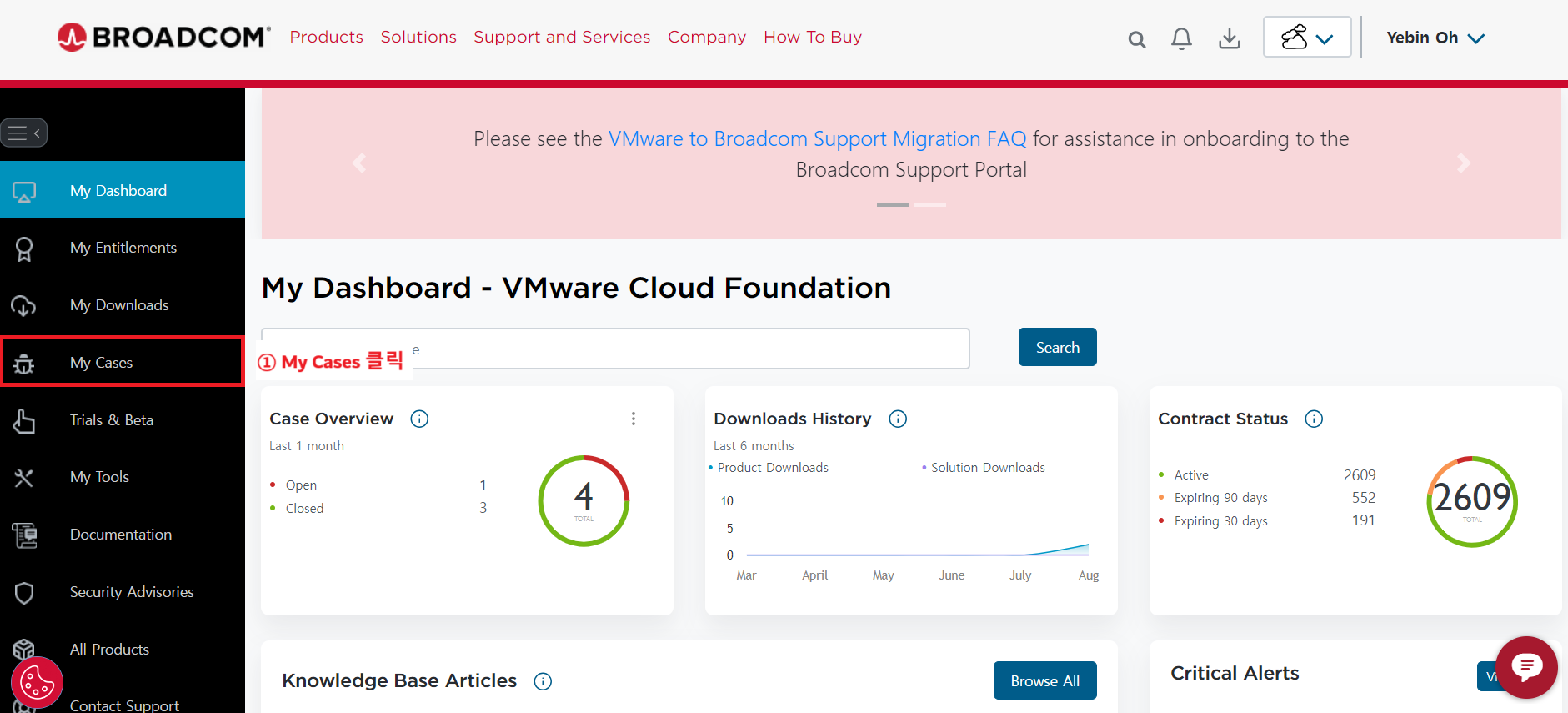
</td><td style="height: 202.288px;">- \[My Case\] 클릭

</td></tr><tr style="height: 279.4px;"><td style="height: 279.4px;">[![image.png](https://bs.etevers.tech/uploads/images/gallery/2025-10/scaled-1680-/TR3image.png)](https://bs.etevers.tech/uploads/images/gallery/2025-10/TR3image.png)

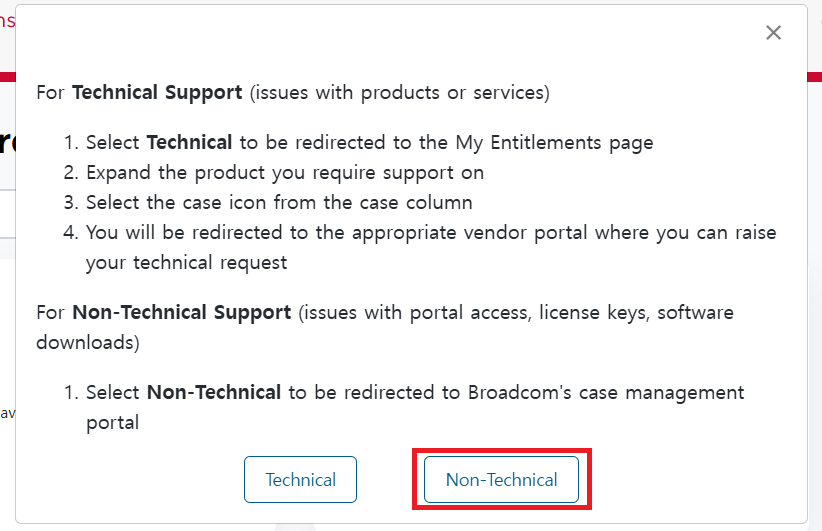
</td><td style="height: 279.4px;">- \[Non-Technical\] 버튼 클릭

</td></tr><tr style="height: 268.163px;"><td style="height: 268.163px;">[![image.png](https://bs.etevers.tech/uploads/images/gallery/2025-10/scaled-1680-/DF9image.png)](https://bs.etevers.tech/uploads/images/gallery/2025-10/DF9image.png)

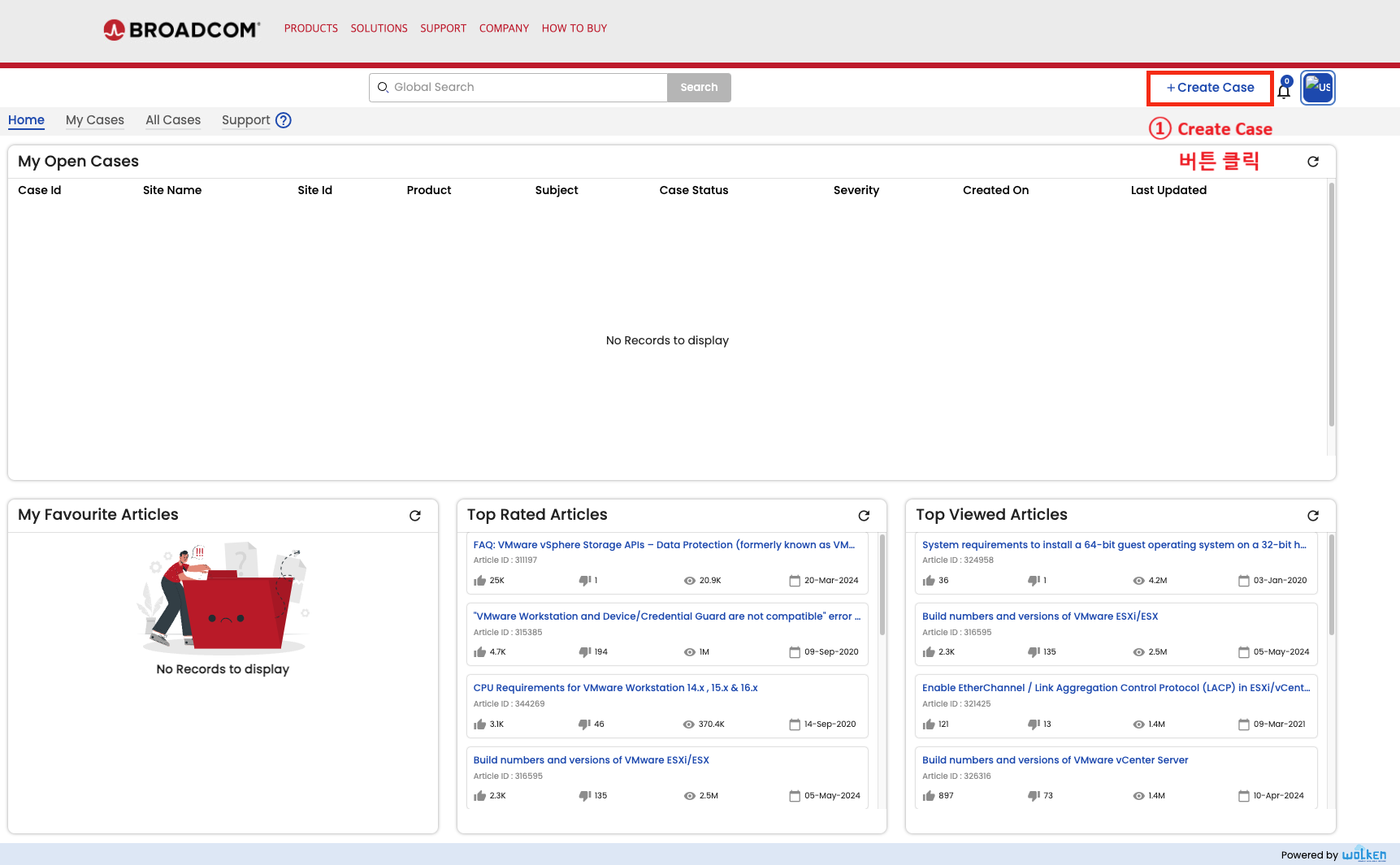
</td><td style="height: 268.163px;">- Wolken 페이지로 이동 후 \[Create Case\] 버튼 클릭하여 케이스 생성

</td></tr><tr style="height: 212.238px;"><td style="height: 212.238px;">[![image.png](https://bs.etevers.tech/uploads/images/gallery/2025-10/scaled-1680-/ONrimage.png)](https://bs.etevers.tech/uploads/images/gallery/2025-10/ONrimage.png)

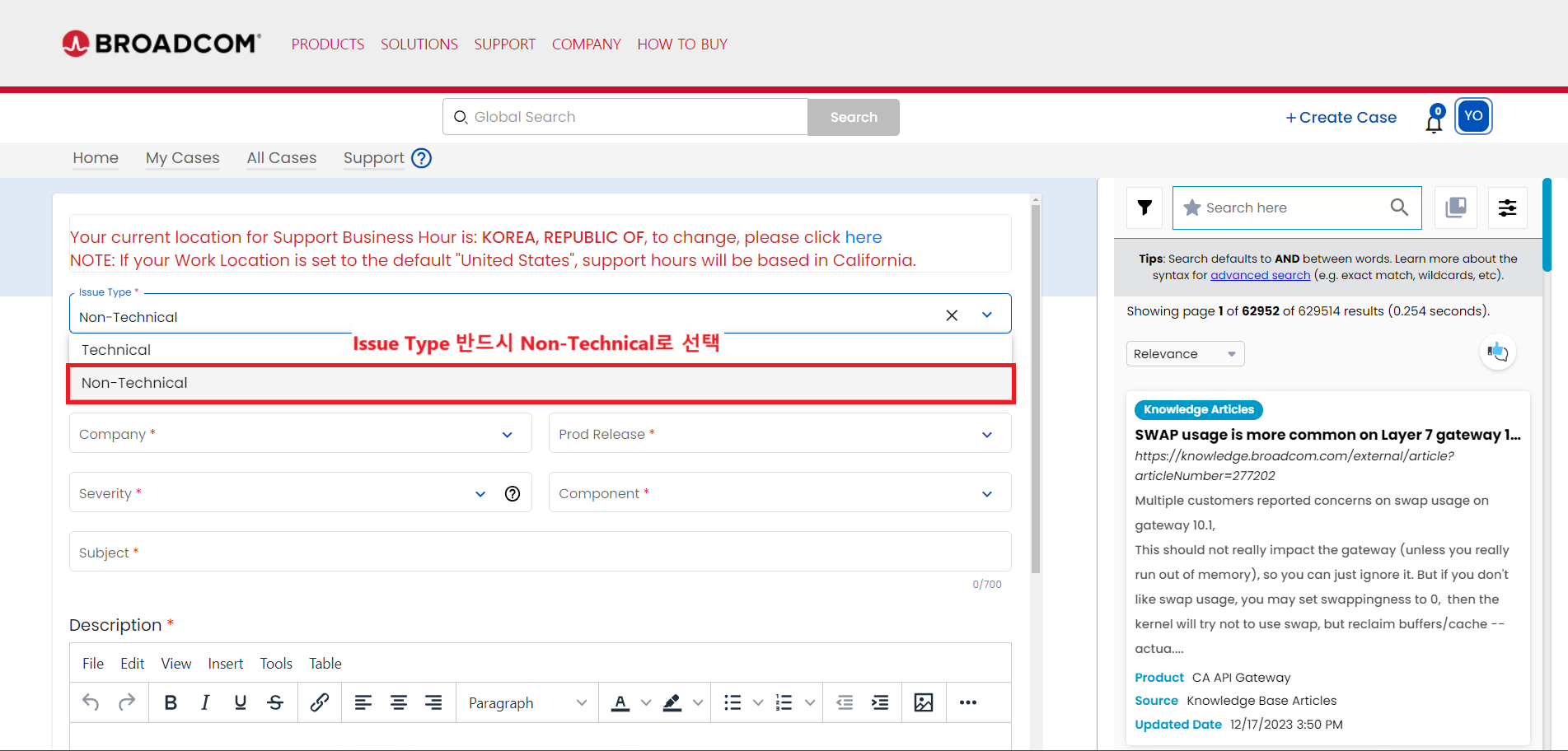
</td><td style="height: 212.238px;">- \[Issue Type\]을 \[Non-Technical\]로 선택 후 오픈

</td></tr><tr style="height: 201.012px;"><td style="height: 201.012px;">[![image.png](https://bs.etevers.tech/uploads/images/gallery/2025-10/scaled-1680-/pD1image.png)](https://bs.etevers.tech/uploads/images/gallery/2025-10/pD1image.png)

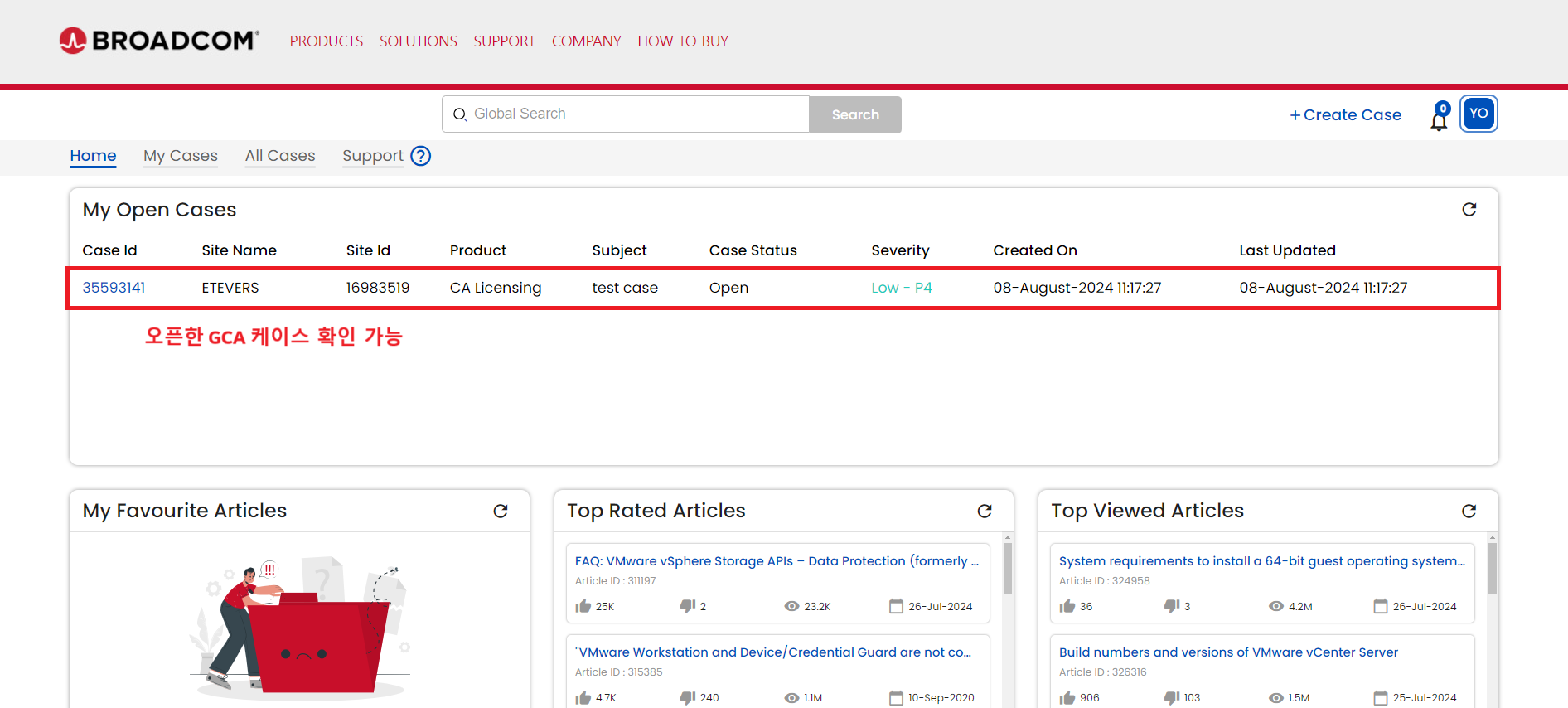
</td><td style="height: 201.012px;">- 오픈한 케이스 확인 가능

</td></tr></tbody></table>

---

#### 라이브챗 이용 방법

<table border="1" id="bkmrk-%EC%9A%B0%EC%B8%A1-%ED%95%98%EB%8B%A8%EC%97%90-%EC%9E%88%EB%8A%94-%EB%9D%BC%EC%9D%B4%EB%B8%8C%EC%B1%97-%EC%95%84%EC%9D%B4%EC%BD%98-%ED%81%B4" style="border-collapse: collapse; width: 100%; height: 7572.8px;"><colgroup><col style="width: 50.0596%;"></col><col style="width: 50.0596%;"></col></colgroup><tbody><tr style="height: 201.663px;"><td style="height: 201.663px;">[![image.png](https://bs.etevers.tech/uploads/images/gallery/2025-10/scaled-1680-/VNBimage.png)](https://bs.etevers.tech/uploads/images/gallery/2025-10/VNBimage.png)

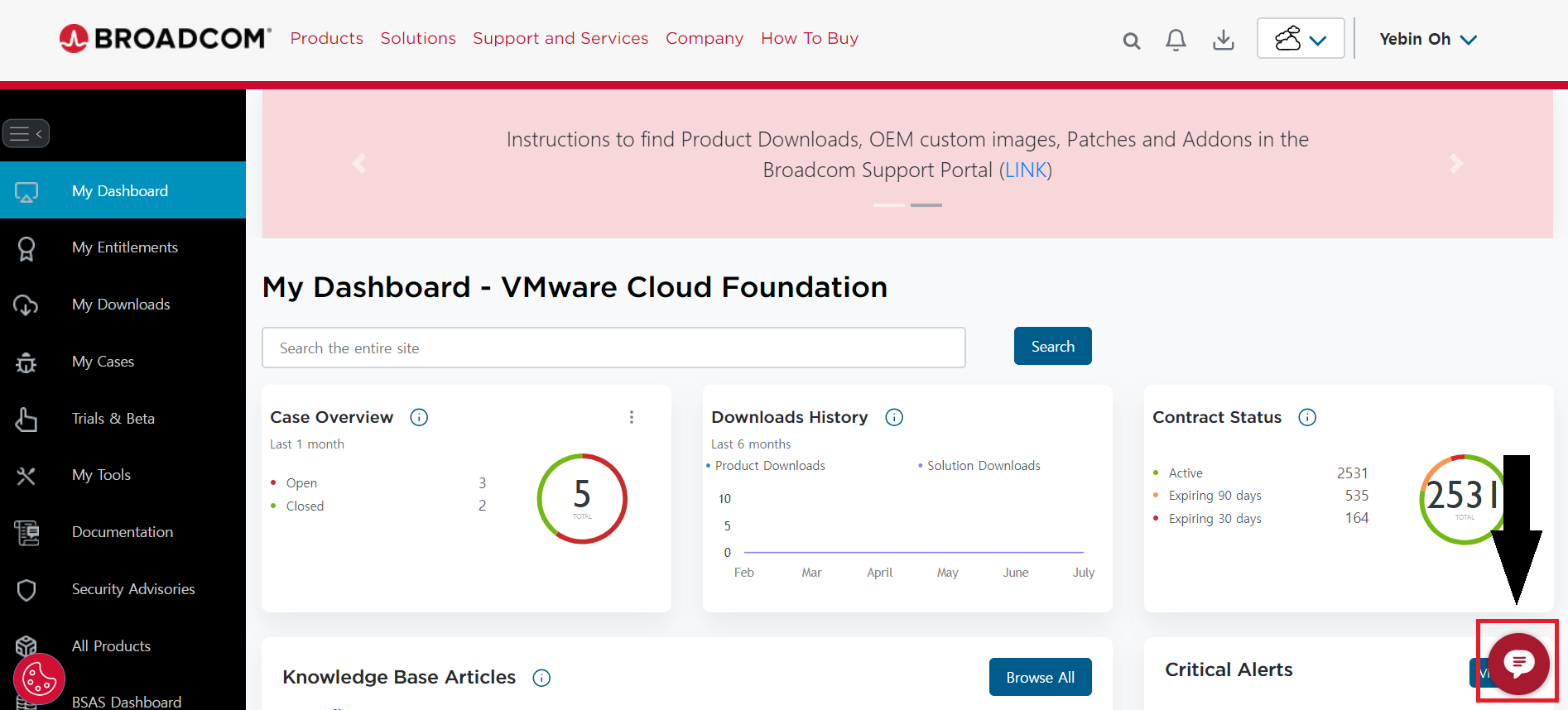
</td><td style="height: 201.663px;">- 우측 하단에 있는 라이브챗 아이콘 클릭

</td></tr><tr style="height: 672.888px;"><td style="height: 672.888px;">[![image.png](https://bs.etevers.tech/uploads/images/gallery/2025-10/scaled-1680-/upqimage.png)](https://bs.etevers.tech/uploads/images/gallery/2025-10/upqimage.png)

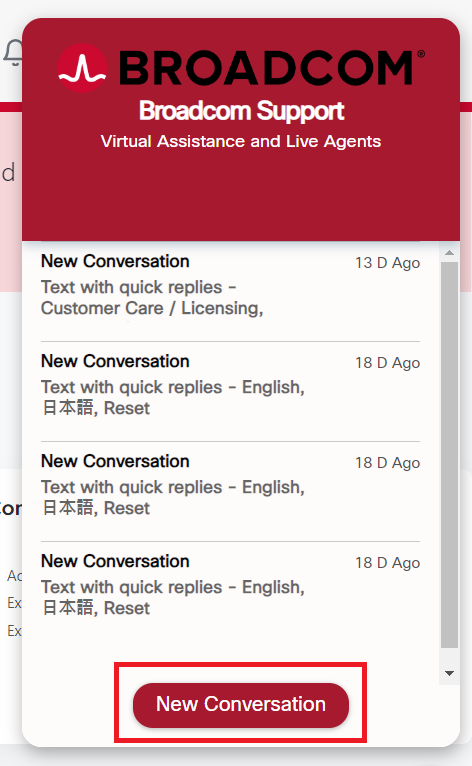
</td><td style="height: 672.888px;">- \[New Conversation\] 클릭

</td></tr><tr style="height: 661.812px;"><td style="height: 661.812px;">[![image.png](https://bs.etevers.tech/uploads/images/gallery/2025-10/scaled-1680-/f4Dimage.png)](https://bs.etevers.tech/uploads/images/gallery/2025-10/f4Dimage.png)

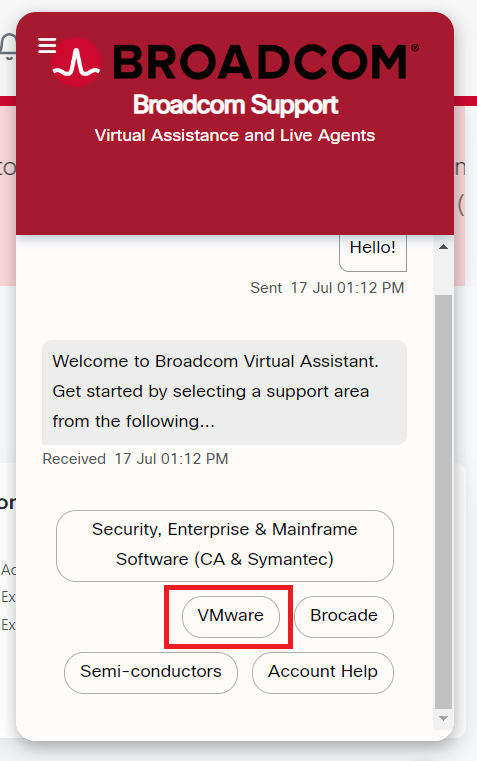
</td><td style="height: 661.812px;">- \[VMware\] 클릭

</td></tr><tr style="height: 674.838px;"><td style="height: 674.838px;">[![image.png](https://bs.etevers.tech/uploads/images/gallery/2025-10/scaled-1680-/TPYimage.png)](https://bs.etevers.tech/uploads/images/gallery/2025-10/TPYimage.png)

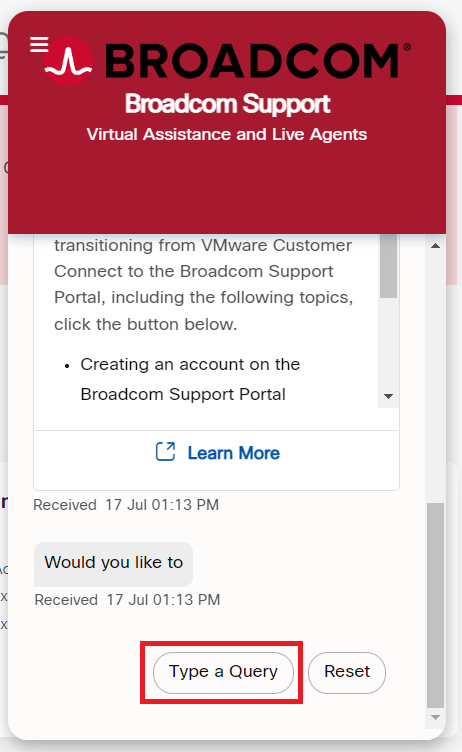
</td><td style="height: 674.838px;">- \[Type a Query\] 클릭

</td></tr><tr style="height: 671.388px;"><td style="height: 671.388px;">[![image.png](https://bs.etevers.tech/uploads/images/gallery/2025-10/scaled-1680-/foximage.png)](https://bs.etevers.tech/uploads/images/gallery/2025-10/foximage.png)

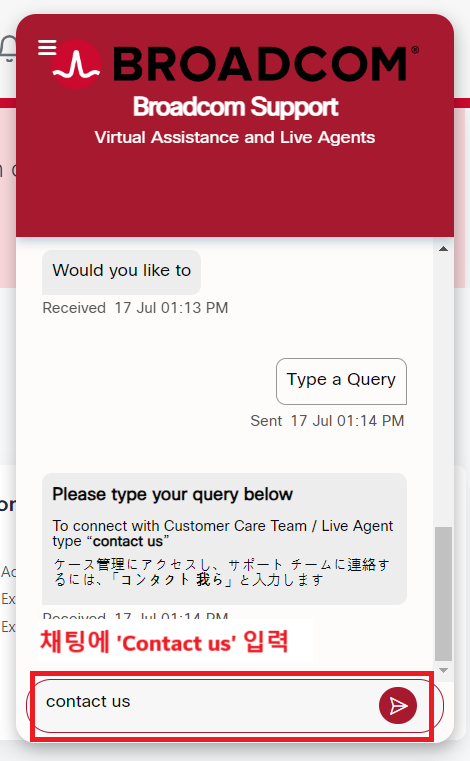
</td><td style="height: 671.388px;">- 채팅창에 \[contact us\] 타이핑

</td></tr><tr style="height: 659.9px;"><td style="height: 659.9px;">[![image.png](https://bs.etevers.tech/uploads/images/gallery/2025-10/scaled-1680-/Jiiimage.png)](https://bs.etevers.tech/uploads/images/gallery/2025-10/Jiiimage.png)

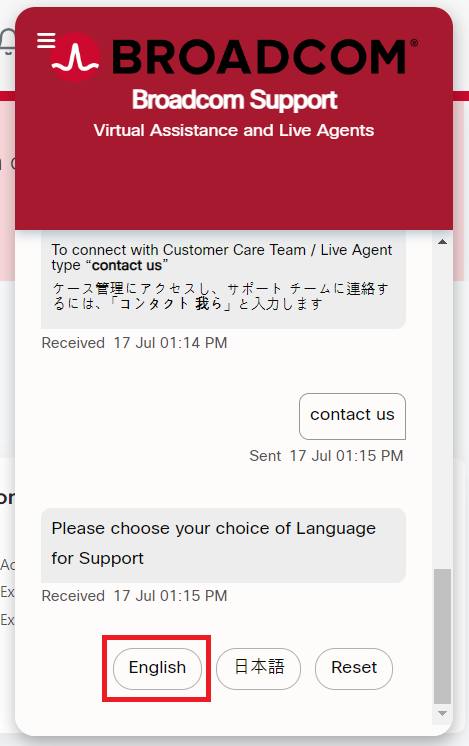
</td><td style="height: 659.9px;">- \[English\] 클릭

</td></tr><tr style="height: 664.875px;"><td style="height: 664.875px;">[![image.png](https://bs.etevers.tech/uploads/images/gallery/2025-10/scaled-1680-/mwDimage.png)](https://bs.etevers.tech/uploads/images/gallery/2025-10/mwDimage.png)

</td><td style="height: 664.875px;">- \[Report a New Case\] 클릭

- - 사진의 경우에는 이미 정상적으로 Site ID 매핑이 되어 있는 계정으로 라이브챗을 실행했기 때문에 계정에 대한 정보가 요약되어 출력되는 것을 볼 수 있음.

</td></tr><tr style="height: 677.6px;"><td style="height: 677.6px;">[![image.png](https://bs.etevers.tech/uploads/images/gallery/2025-10/scaled-1680-/Uu2image.png)](https://bs.etevers.tech/uploads/images/gallery/2025-10/Uu2image.png)

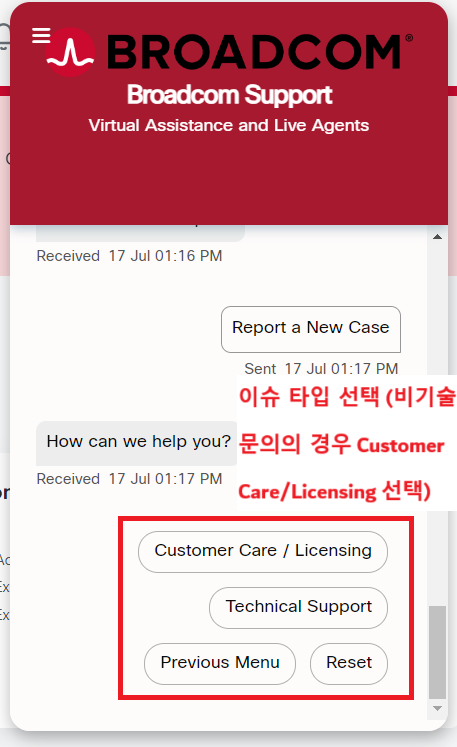
</td><td style="height: 677.6px;">- 원하는 문의 카테고리 선택
    
    
    - Site ID 이슈나 계정 승인 이슈로 문의를 요청하고자 할 때는 \[Customer Care/Licensing\] 선택

</td></tr><tr style="height: 669.737px;"><td style="height: 669.737px;">[![image.png](https://bs.etevers.tech/uploads/images/gallery/2025-10/scaled-1680-/XpAimage.png)](https://bs.etevers.tech/uploads/images/gallery/2025-10/XpAimage.png)

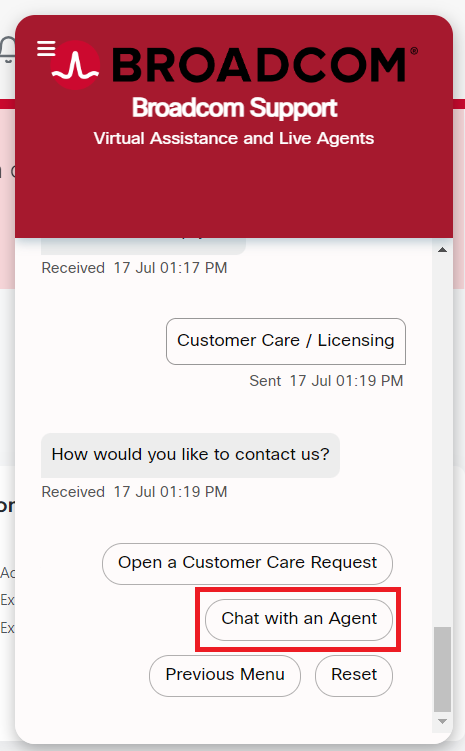
</td><td style="height: 669.737px;">- \[Chat with an Agent\] 선택

</td></tr><tr style="height: 672.338px;"><td style="height: 672.338px;">[![image.png](https://bs.etevers.tech/uploads/images/gallery/2025-10/scaled-1680-/u4mimage.png)](https://bs.etevers.tech/uploads/images/gallery/2025-10/u4mimage.png)

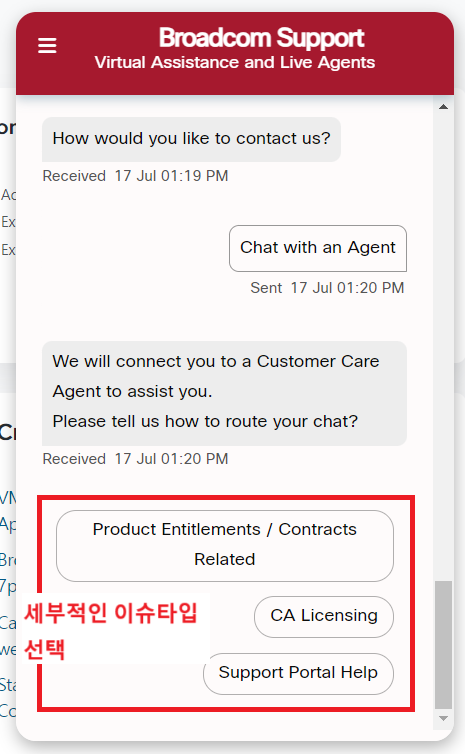
</td><td style="height: 672.338px;">- 문의 카테고리 선택
    
    
    - Site ID 문의나 계정 승인 요청 원할 시, \[Support Portal Help\] 선택

</td></tr><tr style="height: 672.45px;"><td style="height: 672.45px;">[![image.png](https://bs.etevers.tech/uploads/images/gallery/2025-10/scaled-1680-/LEyimage.png)](https://bs.etevers.tech/uploads/images/gallery/2025-10/LEyimage.png)

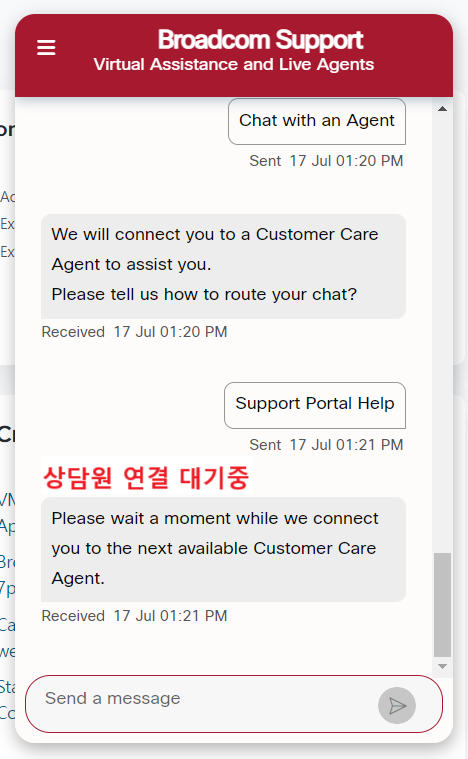
</td><td style="height: 672.45px;">- Agent와 연결해준다는 메시지를 볼 수 있음

</td></tr><tr style="height: 673.312px;"><td style="height: 673.312px;">[![image.png](https://bs.etevers.tech/uploads/images/gallery/2025-10/scaled-1680-/DUSimage.png)](https://bs.etevers.tech/uploads/images/gallery/2025-10/DUSimage.png)

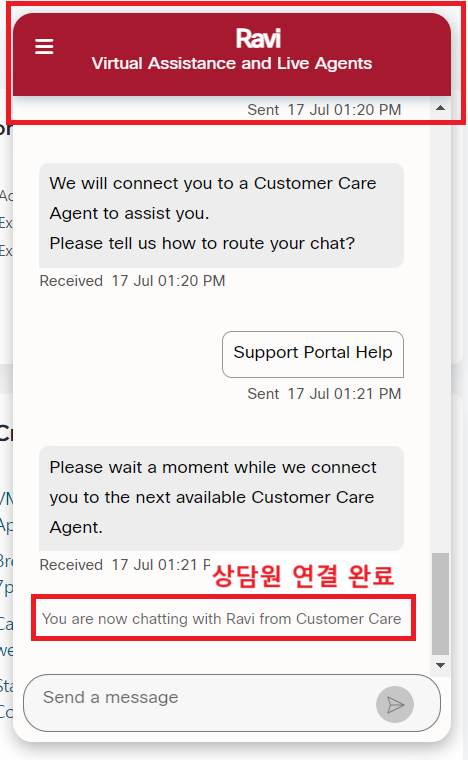
</td><td style="height: 673.312px;">- Agnet와 연결되면 담당 Agent의 이름으로 채팅창 제목이 변경되는 것을 확인할 수 있음
- 이후 영어로 채팅 진행하여 이슈 사항 전달
- 상담 내용 예시는 아래 내용 참고

<p class="callout warning">Agent와 연결되는 데 시간이 소요될 수 있으며, Agent와 연결이 되지 않고 다시 자동응답 과정(위 선택 과정)으로 돌아갈 수 있음.  
담당 Agent를 찾지 못한 것으로, 다른 시간에 문의 진행 혹은 Agent 할당될 때까지 작업 반복.  
</p>

</td></tr></tbody></table>