# vmLIVE - Where and how can you use a 2-node vSAN

## 개요

 VMware에서 주기적으로 진행하는 vmLIVE에 대해 요약, 정리하여 서술한 문서다.

 vSAN의 노드 구성 중 2-노드 구성에 관해 서술한 자료이며, 아래 링크로 원본영상을 확인할 수 있다.(VMware Partner Connect 계정 필요)

- [https://partner-university.vmware.com/share/asset/view/930](https://partner-university.vmware.com/share/asset/view/930)

## 내용

### vSAN의 구축 유형

 크게 3가지로 나뉜다.

- 싱글 사이트
- 2-노드 클러스터
- vSAN 스트레치 클러스터(Stretched 클러스터)

 주로 싱글 사이트, 스트레치 클러스터를 통해 운영하는 경우가 많다.

 2-노드의 경우 원격 사이트의 용도로 주로 사용됐다.

### 2-노드 클러스터의 사용 방안

[![Remote .png](https://bs.etevers.tech/uploads/images/gallery/2024-03/scaled-1680-/remote.png)](https://bs.etevers.tech/uploads/images/gallery/2024-03/remote.png)

- ROBO (Remote / Branch Office)
- Small DR Site (Disaster Recovery)
- Test and Development
- Isolated Lab or Org

### 2-노드 클러스터 

<p class="callout warning">vmLIVE에서 소개한 2-노드 vSAN 클러스터 구성 시 고려, 참고할 수 있는 부분들에 대해 정리함.</p>

#### 호스트 간 네트워크 직접(direct) 연결

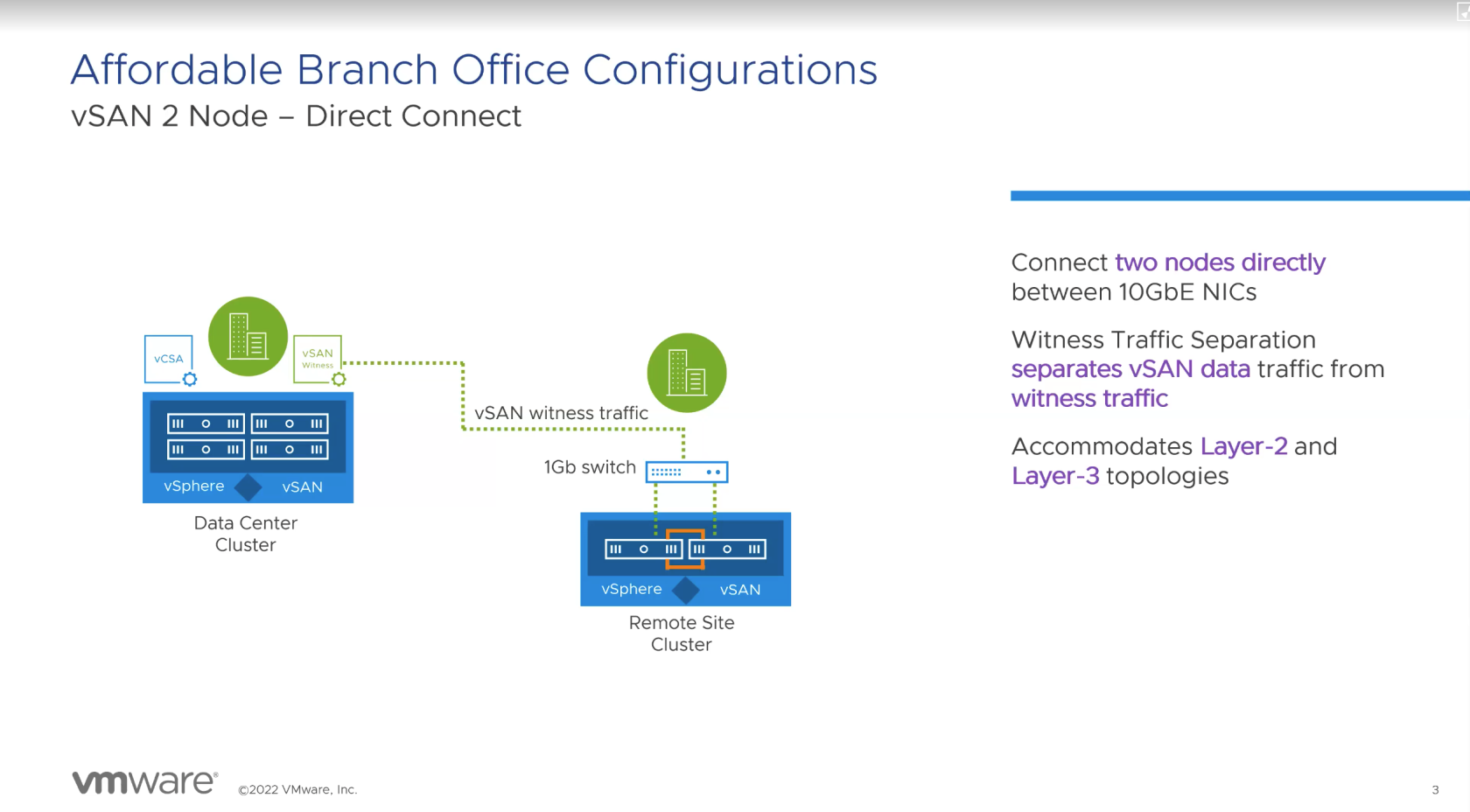
[![Affordable Branch Office Configurations.png](https://bs.etevers.tech/uploads/images/gallery/2024-03/scaled-1680-/MUuaffordable-branch-office-configurations.png)](https://bs.etevers.tech/uploads/images/gallery/2024-03/MUuaffordable-branch-office-configurations.png)

 이미지 오른쪽 Remote Site Cluster의 주황색 선의 표시처럼 호스트와 호스트간 NIC를 직접 연결하여 사용할 수 있다.

 직접 연결할 시, 데이터 트래픽에 대한 추가 스위치가 불필요하다. vSAN의 데이터 트래픽과 감시(witness) 트래픽을 분리하여 구성할 수 있다. 이는 Layer2, Layer3 토폴로지를 수용한다.

#### VMKernel 별 MTU 세팅

[![image.png](https://bs.etevers.tech/uploads/images/gallery/2024-03/scaled-1680-/1z4image.png)](https://bs.etevers.tech/uploads/images/gallery/2024-03/1z4image.png)
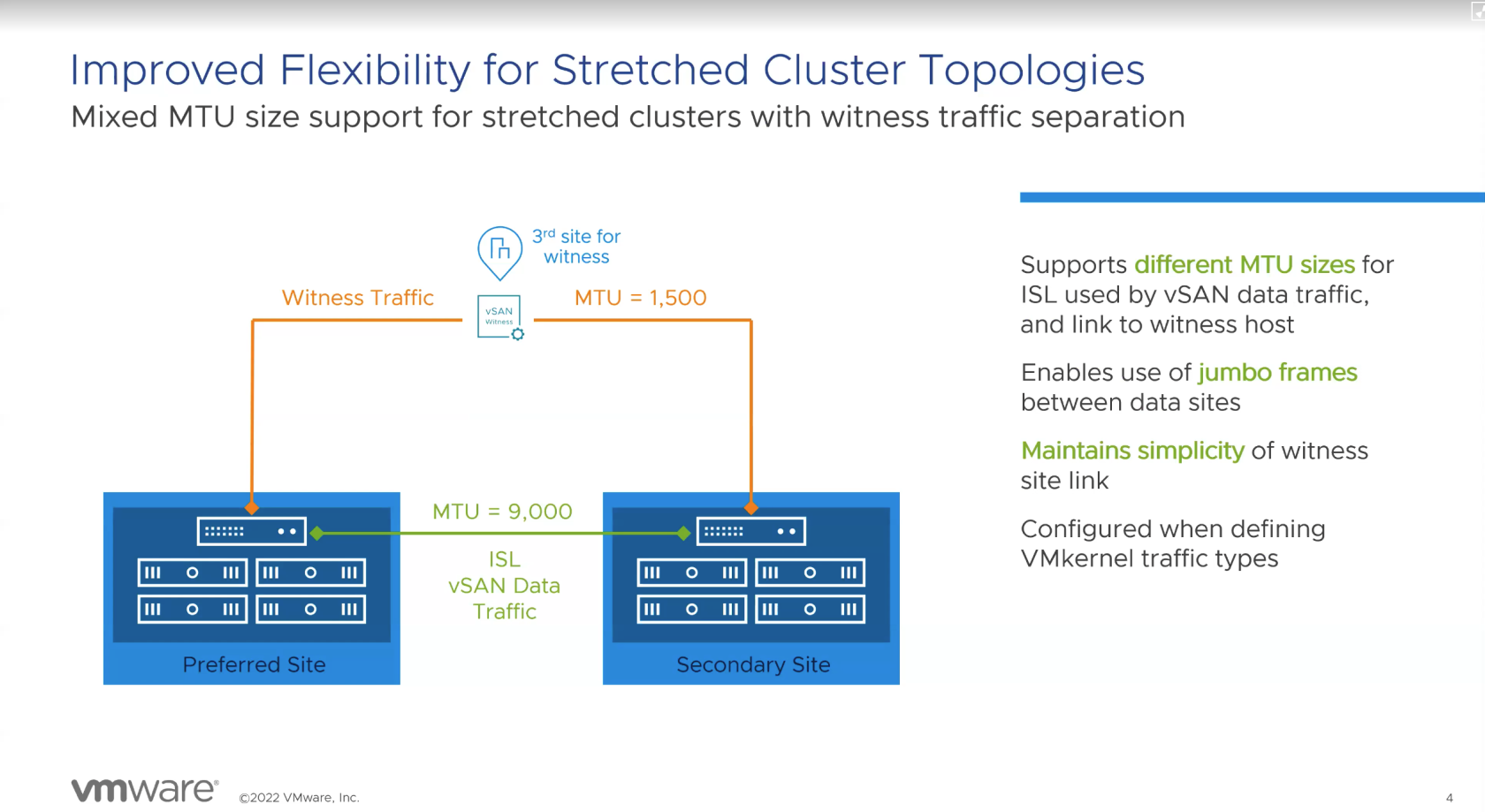
 데이터 트래픽 및 감시 트래픽을 분리하여 구성할 뿐 아니라 MTU에 대해서도 다르게 구성할 수 있다. 데이터 사이트 간 점보 프레임을 지원한다.

 VMkernel의 트래픽 유형을 정의할 때 태그를 통해 구성할 수 있다.

#### 스트레치 클러스터 및 2-노드 클러스터 토폴로지의 감시 개선 방안 

[![Improved Resilience with Stretched Cluster and 2-Node Topologies.png](https://bs.etevers.tech/uploads/images/gallery/2024-03/scaled-1680-/improved-resilience-with-stretched-cluster-and-2-node-topologies.png)](https://bs.etevers.tech/uploads/images/gallery/2024-03/improved-resilience-with-stretched-cluster-and-2-node-topologies.png)
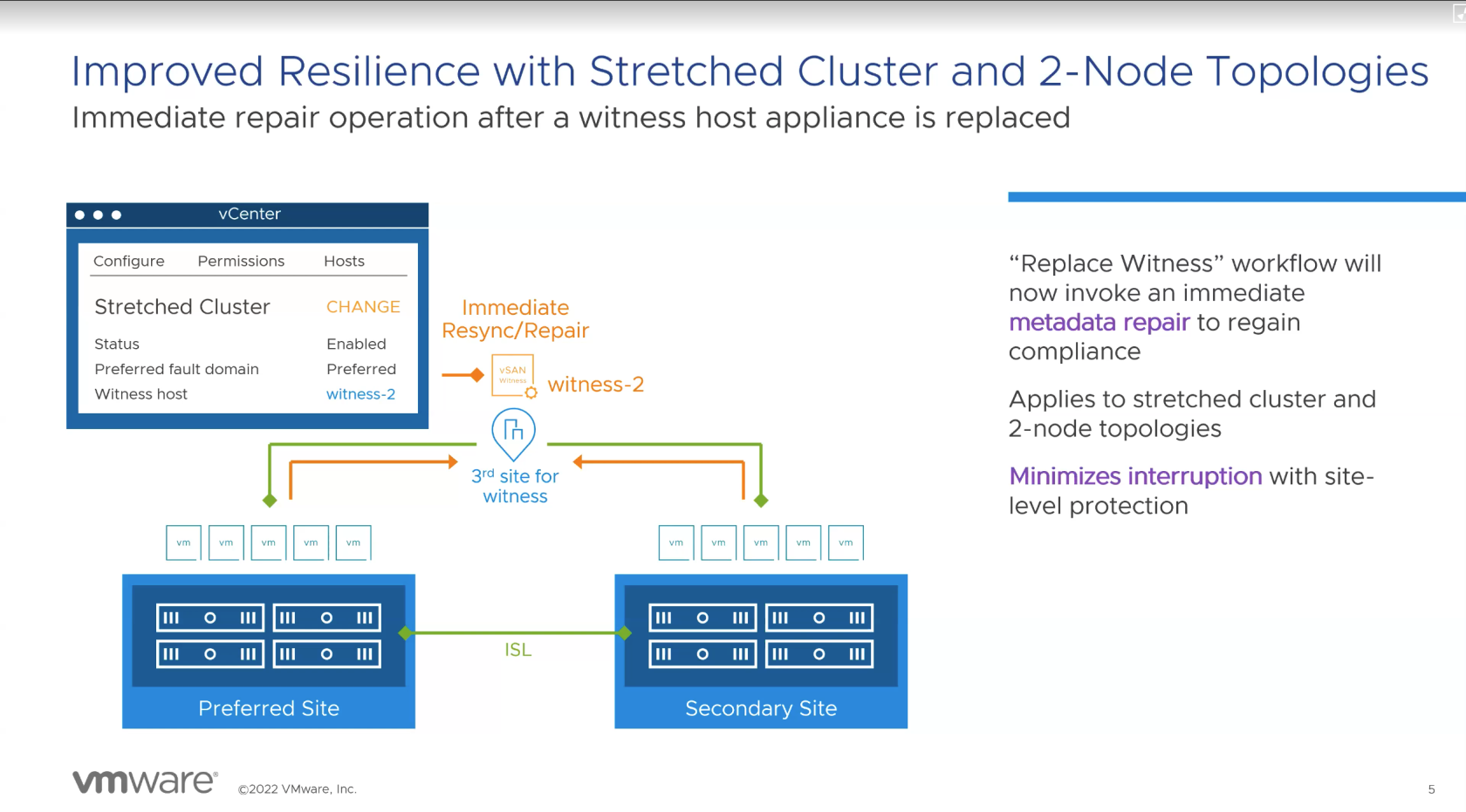
 감시 노드에 장애가 발생할 경우 즉시 메타 데이터 복구 호출을 통해 규정준수를 회복할 수 있다.

 해당 기능은 감시 노드를 사용하는 스트레치 클러스터, 2-노드 토폴로지에 적용된다.

#### 스트레치, 2-노드 클러스터에 사이트 장애 조치 

[![Improved Uptime for Stretched Cluster and 2-Node topologies.png](https://bs.etevers.tech/uploads/images/gallery/2024-03/scaled-1680-/improved-uptime-for-stretched-cluster-and-2-node-topologies.png)](https://bs.etevers.tech/uploads/images/gallery/2024-03/improved-uptime-for-stretched-cluster-and-2-node-topologies.png)
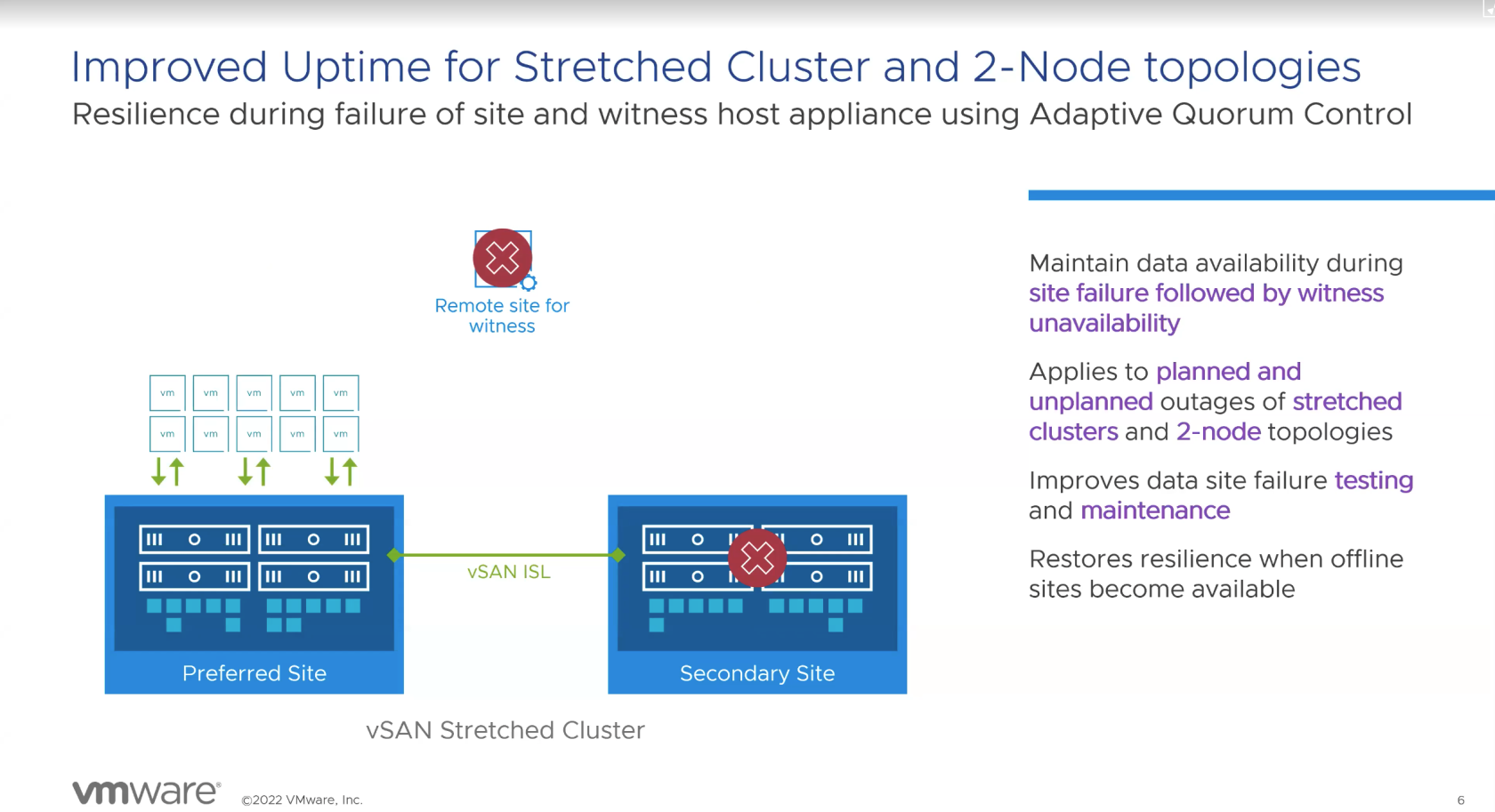
 원격 감시 노드를 사용하는 사이트에 장애 발생시 감시가 불가능해지는 시간동안 데이터의 가용성을 유지할 수 있다.

 감시 노드를 사용하는 스트레치 클러스터, 2-노드 토폴로지에 적용된다.

#### 하나의 감시 노드로 다수의 2-노드 vSAN 클러스터 구성

[![Easily Accommodate Branch Office Environments.png](https://bs.etevers.tech/uploads/images/gallery/2024-03/scaled-1680-/easily-accommodate-branch-office-environments.png)](https://bs.etevers.tech/uploads/images/gallery/2024-03/easily-accommodate-branch-office-environments.png)
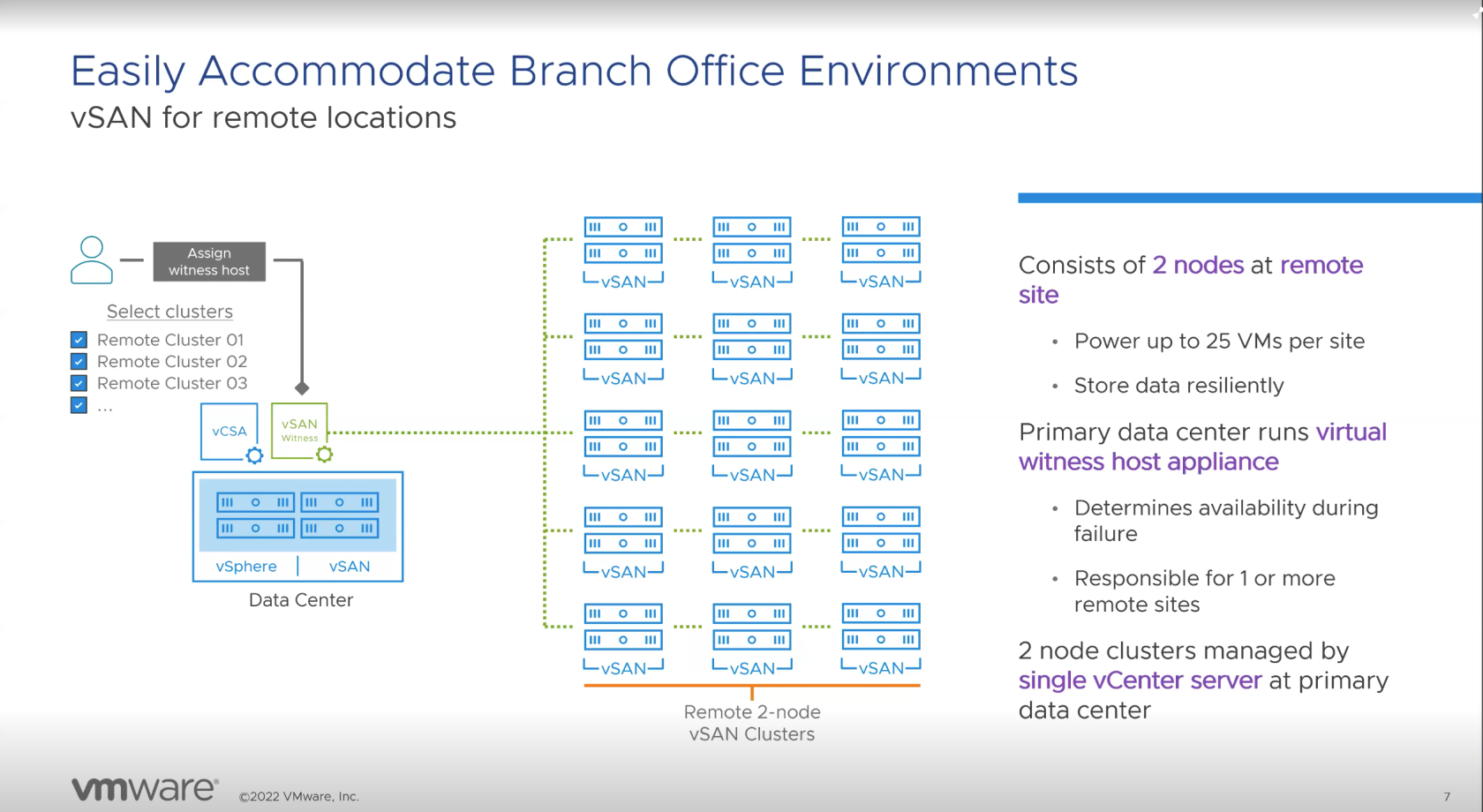
 하나의 vSAN 감시 노드로 여러 2-노드 vSAN 클러스터를 지원할 수 있다.

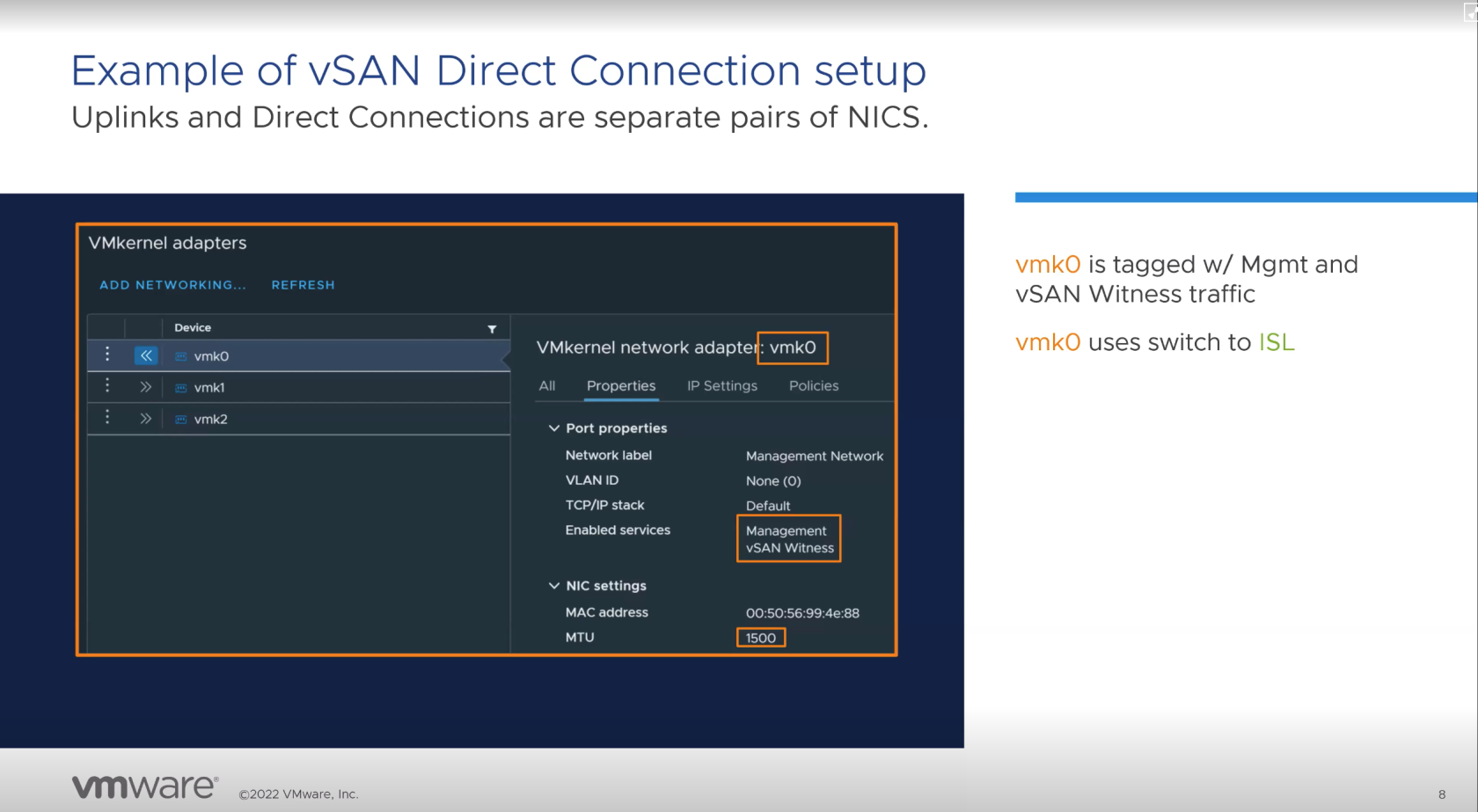
#### VMkernel 트래픽 분리 및 MTU 세팅 예시

[![Uplinks and Direct Connections are separate pairs of NICS..png](https://bs.etevers.tech/uploads/images/gallery/2024-03/scaled-1680-/uplinks-and-direct-connections-are-separate-pairs-of-nics.png)](https://bs.etevers.tech/uploads/images/gallery/2024-03/uplinks-and-direct-connections-are-separate-pairs-of-nics.png)
[![Pasted Graphic 11.png](https://bs.etevers.tech/uploads/images/gallery/2024-03/scaled-1680-/pasted-graphic-11.png)](https://bs.etevers.tech/uploads/images/gallery/2024-03/pasted-graphic-11.png)
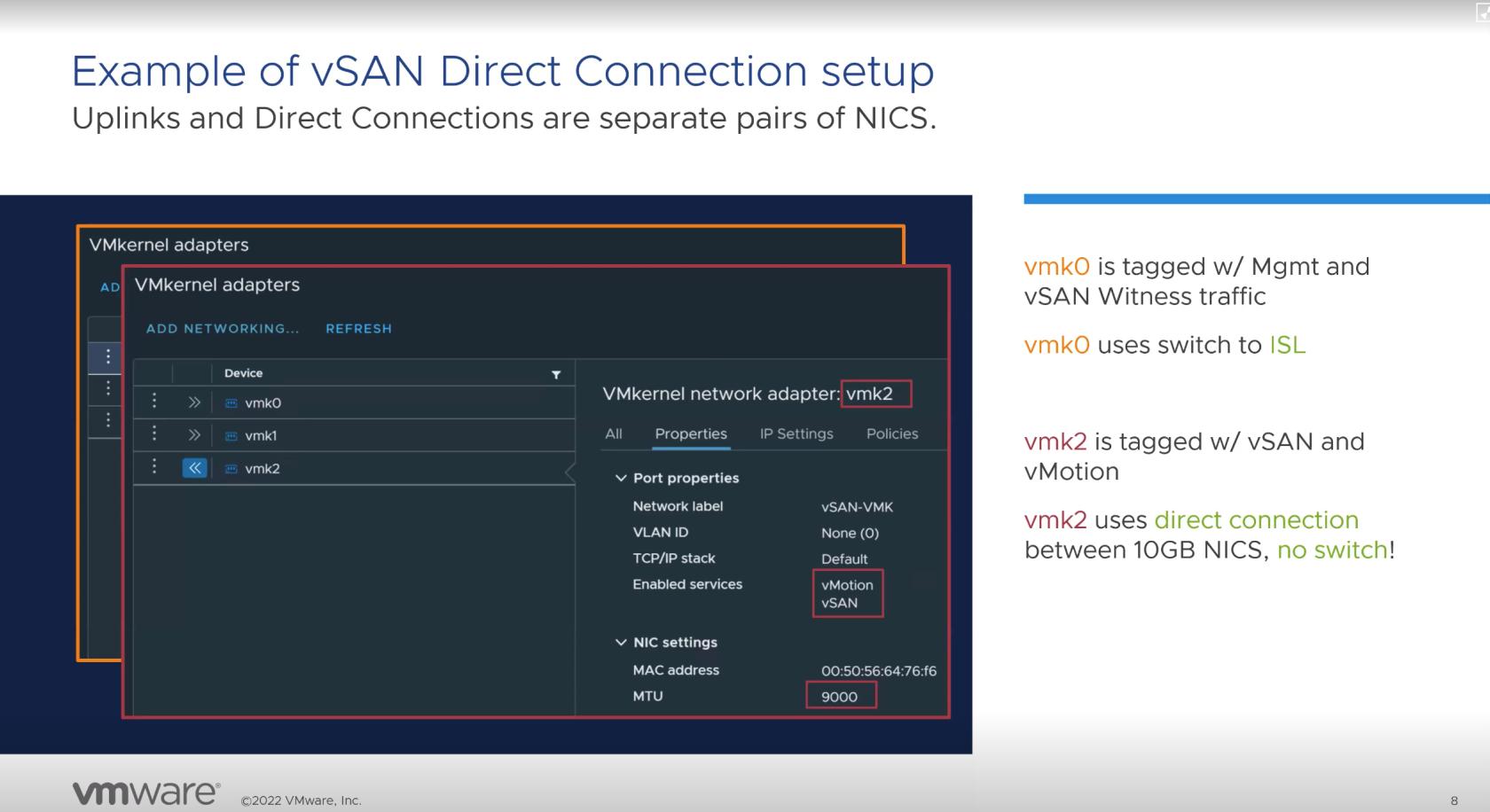
 기존 vSAN 노드 구성은 vSAN을 위한 VMkernel 하나로 vSAN에 대한 트래픽을 처리하지만, 2-노드 구성은 트래픽의 분리가 필요하다.

 이미지처럼 VMKernel 마다 사용할 서비스 태그를 추가하여 트래픽을 분리할 수 있다.

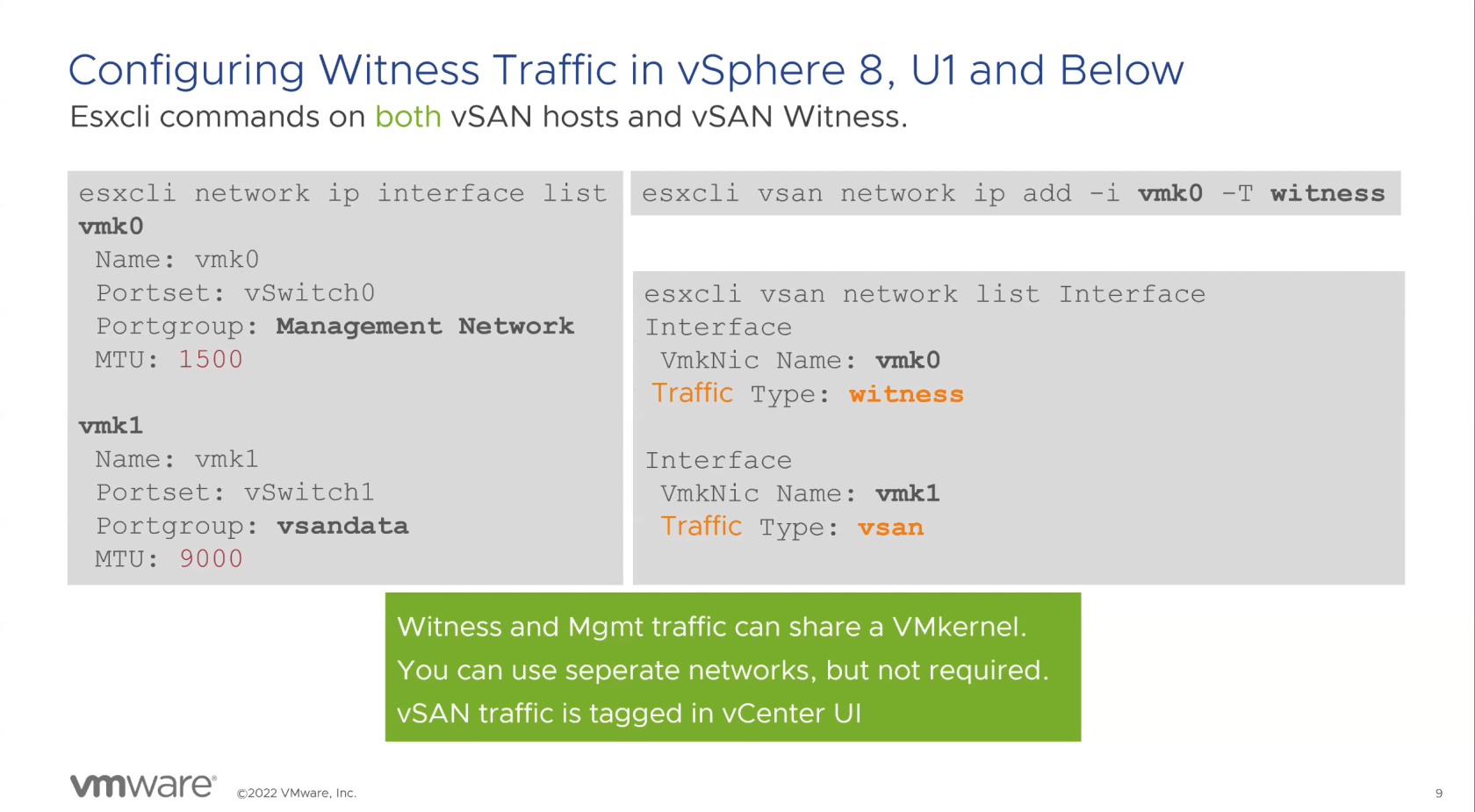
### vSphere 8 업데이트로 인한 VMkernel 태그 지정

#### U1

[![Pasted Graphic.png](https://bs.etevers.tech/uploads/images/gallery/2024-03/scaled-1680-/pasted-graphic.png)](https://bs.etevers.tech/uploads/images/gallery/2024-03/pasted-graphic.png)
#### U2

[![traffic and witness traffic in vCenter.png](https://bs.etevers.tech/uploads/images/gallery/2024-03/scaled-1680-/traffic-and-witness-traffic-in-vcenter.png)](https://bs.etevers.tech/uploads/images/gallery/2024-03/traffic-and-witness-traffic-in-vcenter.png)
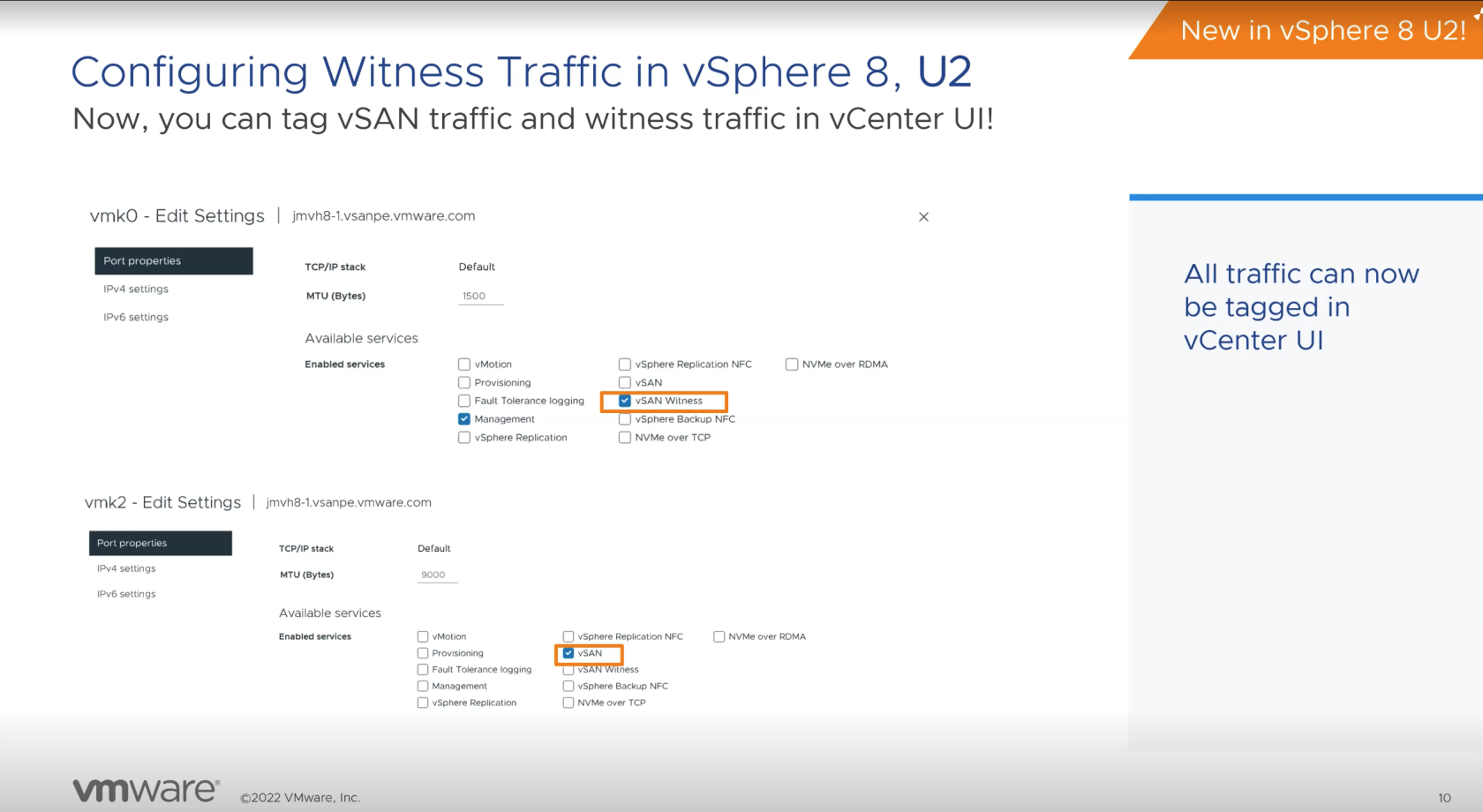
<span class="s1"> vSphere 8 U2 이전 버전의 경우 VMkernel에 vSAN witness관련 서비스 태그를 추가하기 위해 CLI방식만 지원한다.</span>

 vSphere 8 U2<span class="s1">부터</span> <span class="s1">모든</span> 서비스 <span class="s1">관련</span> <span class="s1">태그를</span> vCenter UI에서 <span class="s1">추가할</span> <span class="s1">수</span> 있다<span class="s1">.</span>

## 참조

 vSAN 2-노드에 대한 자세한 내용은 아래 VMware TechZone 사이트에서 확인할 수 있다.

- [https://via.vmw.com/tchzcoreno1848](https://via.vmw.com/tchzcoreno1848)